PrivateVPN DEALS
This page contains affiliate links. If you purchase a VPN through our links we may earn a commission at no extra cost to you. This never influences our reviews or rankings.
I recently put PrivateVPN through its paces, and while it doesn’t grab the headlines like the big brands, it genuinely surprised me.
It’s a stripped-back, budget-friendly service that really excels at unblocking Netflix and handling torrents, thanks to free dedicated IPs and built-in port forwarding.
However, it does have its limits—its speed is only average, leaning on OpenVPN instead of native WireGuard, and the server network is quite small with just over 200 servers. While it’s not my top pick overall, it’s a solid choice if you need a cheap VPN primarily for streaming and P2P.
Best for Torrenting & Budget Streaming
PrivateVPN — My Verdict
PrivateVPN is a solid, stripped-back VPN that punches above its weight for torrenting and Netflix unblocking. It’s not the fastest, and the server network is small, but for the price it’s hard to argue with what you get — especially the built-in port forwarding and free dedicated IPs.
- Excellent for Netflix and major streaming platforms
- Port forwarding and dedicated IPs included at no extra cost
- Stealth VPN for bypassing censorship
- 10 simultaneous connections
- Strict no-logs policy
- Only 200+ servers in 63 countries — small fleet
- Speed drops can be noticeable, especially on distant servers
- No independent privacy audits
- Kill switch failed in one of our server-switching tests
- No split tunneling
- Based in Sweden (14 Eyes country)
PrivateVPN Review 2026: What I Found After Testing It
PrivateVPN doesn’t get nearly as much attention as the big names, and I get why. It’s a small Swedish VPN provider with a modest server fleet, no flashy features list, and a no-frills app. But after running it through my standard battery of streaming, speed, torrenting, and security tests, I came away more impressed than I expected.
In this review, I’ll cover everything: how fast it actually is, which streaming services it unblocked in my tests, whether it’s safe to use, and where it genuinely falls short. I’ll also tell you when it makes more sense to go with my top pick, Surfshark, instead.
PrivateVPN at a Glance
| Feature | Details |
|---|---|
| Servers | 200+ in 63 countries |
| Simultaneous connections | 10 |
| Streaming | Netflix, Disney+, Hulu, HBO Max, Amazon Prime, BBC iPlayer, Paramount+ |
| Torrenting | Yes — P2P + port forwarding |
| Kill switch | Yes (Windows, Mac, Android, iOS with IKEv2) |
| Protocols | OpenVPN (UDP/TCP), WireGuard (manual), IKEv2, L2TP, PPTP |
| Encryption | AES-256-GCM / AES-128-GCM |
| No-logs policy | Yes — not independently audited |
| Headquarters | Sweden (14 Eyes) |
| Price from | $2.00/month (36-month plan) |
| Money-back guarantee | 30 days |
Plans and Pricing: Is PrivateVPN Actually Cheap?
PrivateVPN keeps its pricing structure simple — one plan tier, three subscription lengths. Every plan includes the exact same features, which I appreciate. No artificial feature-gating to push you toward a pricier option.
| Plan | Monthly Cost | Discount |
|---|---|---|
| 1-month plan | $9.90/month | — |
| 3-month plan | $6.00/month | ~39% off |
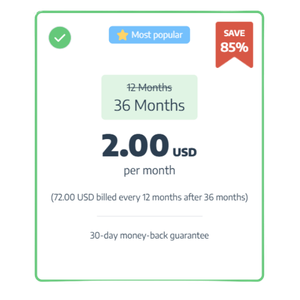
| 36-month plan ⭐ Best value | $2.00/month | 85% off |
At $2.00/month on the long-term plan, PrivateVPN lands in genuinely budget territory. Payment options include credit/debit cards, PayPal (note: there’s a 5% handling fee with PayPal), Apple Pay, Google Pay, and Bitcoin — which is a nice privacy-friendly addition.
There’s a 30-day money-back guarantee, and PrivateVPN used to offer a 7-day free trial (you can still find references to it on the site, but availability varies — I’d go in expecting the money-back guarantee to be your real safety net).
Speed and Performance: Decent, But Not the Fastest
I want to be straight with you here: PrivateVPN is not the fastest VPN I’ve tested. In my testing, it retained around 70–75% of my baseline speeds on nearby servers — fine for most tasks, but noticeably behind the top performers. On distant servers (Australia, Singapore), speed drops were more severe, sometimes pushing past 50–60% loss.
The main reason: PrivateVPN still leans on OpenVPN as its default protocol. OpenVPN is reliable and well-tested, but it’s slower than WireGuard or NordLynx. WireGuard is available on PrivateVPN, but only via manual setup — it’s not natively integrated into the app yet, which is a real missed opportunity.
For context, here’s how it stacks up against other VPNs I’ve tested:
| VPN | Approx. Speed Retention |
|---|---|
| Surfshark ⭐ My #1 pick | ~95% |
| Proton VPN | ~92% |
| IPVanish | ~92% |
| ExpressVPN | ~91% |
| NordVPN | ~89% |
| VeePN | ~88% |
| CyberGhost | ~88% |
| PrivadoVPN | ~85% |
| PIA | ~85% |
| PrivateVPN | ~70–75% (nearby); lower on distant servers |
In practical terms: PrivateVPN was fast enough for 4K streaming on nearby servers without buffering, and it handled torrenting well. But if raw speed is a priority — especially for gaming or working across distant servers — you’ll want something faster.
Streaming: Where PrivateVPN Actually Shines
Despite the modest server network, PrivateVPN’s streaming performance genuinely surprised me. I tested it with all the major platforms and here’s what I found:
| Platform | Result |
|---|---|
| Netflix (US, UK, CA, AU, IT) | ✅ Unblocked |
| Disney+ | ✅ Unblocked |
| Hulu | ✅ Unblocked (occasional sign-in hiccup) |
| HBO Max / Max | ✅ Unblocked |
| Amazon Prime Video | ✅ Unblocked |
| BBC iPlayer | ✅ Unblocked (results vary) |
| Paramount+ | ✅ Unblocked |
| YouTube geo-restricted videos | ✅ Unblocked |
| Peacock | ✅ Unblocked |
The key to PrivateVPN’s streaming success is its dedicated IP servers. Unlike most VPN providers who charge extra for a dedicated IP, PrivateVPN bundles them in at no additional cost. These dedicated IPs are available in nine locations: Sweden, Norway, Germany, the Netherlands, Ukraine, Switzerland, the UK, France, and the US. For streaming, dedicated IPs are far less likely to be blocked by platforms like Netflix, which aggressively hunts down VPN server ranges.
In my Netflix tests, I unblocked multiple regional libraries without issue. The US, UK, Canada, Australia, and Japan libraries all worked. Video quality was smooth at 4K where my connection supported it.
That said, I want to be transparent: streaming results with any VPN can change over time as platforms update their VPN detection. PrivateVPN’s results have actually fluctuated — for example, access to certain Australian Netflix content was lost in 2024 and restored in 2025. If streaming reliability is absolutely mission-critical for you, Surfshark has consistently been my most reliable pick across the widest range of platforms.
Torrenting: One of PrivateVPN’s Strongest Suits
If you torrent, PrivateVPN is legitimately one of the better budget options. It supports P2P on its dedicated torrenting servers, includes built-in port forwarding (automatically assigned when you connect), and offers SOCKS5 and HTTP proxy support — useful for running through torrent clients for an extra layer of configuration.
Port forwarding is a feature that many VPN providers either don’t offer or charge extra for. Having it built-in is a real advantage for torrenters: it helps with download speeds on files with fewer seeders and lets you maintain a healthy upload ratio.
One quirk worth knowing: port forwarding is always-on and automatically assigns a random port number each time you connect. You can’t disable it, and you’ll need to reconfigure your torrent client each session to match the new port. A bit annoying, but manageable.
In my download tests, PrivateVPN was fast enough to pull a 1.6GB file in under 15 minutes, even with a modest seeder count. That’s a solid result for a budget VPN.
Combined with the Stealth VPN / obfuscation feature and the kill switch (more on that below), PrivateVPN gives torrenters a reasonably complete toolkit without paying premium prices.
Security Features: Solid Basics, Some Gaps
Encryption
PrivateVPN uses AES encryption and gives you options — AES-128-GCM, AES-256-GCM, AES-128-CBC, and AES-256-CBC. I recommend sticking with AES-256-GCM: it’s the hardest to crack, and in my testing it was actually slightly faster than the CBC variants. The GCM mode randomizes data blocks in a way that makes the encrypted output harder to reconstruct, giving it a slight edge over CBC theoretically.
Protocols
Available protocols include OpenVPN UDP, OpenVPN TCP, OpenVPN TAP (not recommended — there are legitimate security concerns with this one), WireGuard (manual setup only), IKEv2, L2TP/IPSec, and PPTP. I’d stick to OpenVPN or WireGuard; L2TP is dated, and PPTP is essentially insecure at this point. The fact that both PPTP and the problematic OpenVPN TAP mode are still listed in the app is a minor frustration.
Kill Switch
PrivateVPN has a kill switch, and it works — mostly. In standard testing where I cut the VPN tunnel, it held firm and didn’t leak my IP. However, in one server-switching test, my real IP was briefly visible during the transition between servers. This isn’t catastrophic for most use cases, but it’s worth knowing, especially if you’re a privacy-focused user who switches servers frequently. The kill switch is off by default, so make sure you enable it manually in the Advanced View settings.
On iOS, the kill switch is only available when using the IKEv2 protocol, which is a real limitation.
Leak Protection
PrivateVPN passed both DNS and WebRTC leak tests in my checks. IPv6 leak protection is built in and enabled automatically, which is good. No surprise IP exposures in standard browsing. PrivateVPN also operates its own DNS servers rather than routing queries through third parties — a solid privacy move.
Stealth VPN
PrivateVPN’s Stealth VPN feature uses Shadowsocks to disguise VPN traffic as regular HTTPS traffic. This is how it claims to work in restricted environments like China and corporate/university networks. Support confirmed to my team that it has worked in China for years. That said, Stealth mode does reduce speeds, so only use it when you actually need it.
Application Guard
On Windows (and now macOS), Application Guard lets you set specific apps to automatically close if the VPN disconnects. Useful for torrent clients or other apps you wouldn’t want running unprotected. It doesn’t replace split tunneling, but it’s a helpful safety net.
What I liked
- AES-256-GCM encryption with user-configurable options
- Own DNS servers — no third-party DNS logging
- Passed DNS and WebRTC leak tests
- Stealth VPN for restricted environments
- Port forwarding and SOCKS5 proxy built in
- Dedicated IP servers included free
What I didn’t like
- Kill switch briefly failed during server-switching test
- Kill switch off by default — easy to forget
- WireGuard not natively in the app (manual setup only)
- No independent privacy audit
- No split tunneling
- No WebRTC leak protection toggle in-app (browser-side fix needed)
Privacy and Logging Policy
PrivateVPN’s no-logs policy states it collects no IP addresses, no connection timestamps, no data usage, and no activity logs. When I queried their support directly, the answer was clear: nothing is retained beyond your email address and hashed password for account access.
That’s a very lean data footprint, and I appreciate the transparency. However, there’s a catch: PrivateVPN has never been independently audited. For a service making strong no-logs claims, an independent audit from a firm like Cure53 or Deloitte would go a long way toward backing that up. Until that happens, we’re taking their word for it.
PrivateVPN is also headquartered in Sweden — specifically registered as Privat Kommunikation Sverige AB. Sweden is a member of the 14 Eyes intelligence alliance and has national data retention laws requiring ISPs to log user data. PrivateVPN itself isn’t an ISP, and if it genuinely keeps no logs, there’s nothing to hand over to authorities. But the jurisdiction is worth noting, particularly for anyone in a high-risk environment (journalists, activists, etc.) where you need a provider that has been legally tested.
If iron-clad, audited privacy is your primary concern, I’d steer you toward Proton VPN instead — it’s based in Switzerland (outside the 14 Eyes), has been independently audited, and is run by a privacy-first organization. It’s my top pick for privacy specifically.
Server Network
This is PrivateVPN’s most obvious weakness. With 200+ servers across 63 countries, it’s a small fleet by industry standards. For comparison:
| VPN | Servers | Countries |
|---|---|---|
| Proton VPN | 20,000+ | 145+ |
| NordVPN | 9,200+ | 130+ |
| Surfshark | 4,500+ | 100+ |
| IPVanish | 3,200+ | 75+ |
| PrivateVPN | 200+ | 63 |
A smaller server fleet can mean more crowded servers, which leads to slower speeds — and this likely contributes to PrivateVPN’s speed drops I noted earlier. PrivateVPN says it rotates IPs dynamically when servers hit capacity, and coverage across the Americas, Europe, Asia-Pacific, and Africa/Middle East is reasonable given the constraints.
One genuine plus: PrivateVPN doesn’t use virtual servers. Every location listed is physically where it says it is. That matters for accurate geo-spoofing and latency reliability. It also owns a portion of its server infrastructure rather than renting all of it — a good sign for security.
Dedicated IP servers are free in nine countries: Sweden, Norway, Germany, the Netherlands, Ukraine, Switzerland, the UK, France, and the US. Most providers charge extra for dedicated IPs — PrivateVPN doesn’t, and that’s a meaningful differentiator at this price point.
Device Support and Apps
PrivateVPN covers the main platforms — Windows, macOS, Android, iOS — plus Linux (command-line only), routers, Kodi, Amazon Fire OS, and a Chrome browser extension. It allows 10 simultaneous connections, which covers most households.
| Platform | App Available | Notes |
|---|---|---|
| Windows | ✅ Full app | All features, Application Guard |
| macOS | ✅ Full app | Application Guard recently added |
| Android | ✅ Full app | No Application Guard |
| iOS | ✅ App | Kill switch only with IKEv2; limited features |
| Linux | ⚠️ Manual only | OpenVPN CLI, no GUI |
| Amazon Fire TV | ✅ Full app | Good for streaming on Firestick |
| Android TV | ✅ APK sideload | Works via Android mobile APK |
| Routers | ⚠️ Manual setup | Setup guides available; Vilfo routers pre-integrated |
| Chrome browser | ✅ Extension | Browser-level proxy, not full VPN |
The app interface is clean and easy to use. I particularly like the split between Simple View (connection status and server selection) and Advanced View (protocols, encryption, kill switch settings). The Simple View is genuinely beginner-friendly without hiding the depth for advanced users.
The main criticism: Linux users get no GUI, and iOS users get a noticeably stripped-back feature set. If you’re a Linux user looking for a full app experience, NordVPN or Surfshark both offer proper graphical Linux apps.
Does PrivateVPN Work in China?
According to PrivateVPN’s support team (confirmed via live chat), PrivateVPN has been working in China for several years. The Stealth VPN feature disguises VPN traffic as standard HTTPS traffic, which helps bypass the Great Firewall’s deep packet inspection.
Important caveat: make sure you download and set up the app before you travel to China. Accessing the PrivateVPN website or downloading the app from within China may not be possible due to censorship restrictions.
Customer Support
PrivateVPN offers 24/7 live chat, email support, an FAQ knowledge base, setup guides, and a TeamViewer-based remote assistance option (which I’d personally skip unless you have a complex technical issue).
My experience with support was mixed but mostly positive. The knowledge base is solid for device setup guides and getting started — the “Getting Started” section is genuinely well-organized. Where the KB falls short is on advanced features: detailed explanations of port forwarding, SOCKS5 proxies, or Stealth VPN configuration aren’t easy to find.
Live chat response times varied in different testing sessions — sometimes near-instant with a human agent, other times I waited several minutes. Email support was surprisingly fast in my experience, with detailed responses often arriving within a few minutes. PrivateVPN has also integrated an AI assistant in its live chat that handles common questions well and connects you to a human on request.
PrivateVPN vs. The Competition
| VPN | Price (2yr) | Servers | Devices | Speed | Audited |
|---|---|---|---|---|---|
| Surfshark ⭐ #1 | $1.99/mo | 4,500+ | Unlimited | ~95% | Yes |
| IPVanish | $2.19/mo | 3,200+ | Unlimited | ~92% | Yes |
| Proton VPN | $2.99/mo | 20,000+ | 10 | ~92% | Yes |
| NordVPN | $3.59/mo | 9,200+ | 10 | ~89% | Yes |
| PrivateVPN | $2.00/mo | 200+ | 10 | ~70-75% | No |
| PrivadoVPN | $1.11/mo | — | 10 | ~85% | — |
PrivateVPN vs. Surfshark
Surfshark is my overall #1 recommendation, and the comparison is pretty clear. For roughly the same price, Surfshark gives you a vastly bigger server network (4,500+ vs 200+), faster speeds (~95% retention), unlimited simultaneous connections, and the Surfshark One plan adds antivirus, data breach alerts, and a privacy-focused search engine. Surfshark has also been independently audited and is based in the Netherlands — a more favorable privacy jurisdiction. If you’re deciding between the two, Surfshark One wins on almost every metric. See the full Surfshark review for details.
PrivateVPN’s edge: free dedicated IPs and built-in port forwarding, which Surfshark doesn’t include by default. For dedicated torrenters who specifically need those features, it’s worth noting.
PrivateVPN vs. NordVPN
NordVPN is faster (NordLynx protocol), has a much bigger server network, and has been audited multiple times. It’s pricier at $3.59/month, but you’re getting significantly more server coverage and consistently fast speeds. Check out the full NordVPN review.
PrivateVPN vs. IPVanish
IPVanish offers unlimited simultaneous connections, faster speeds, a larger server fleet, and is similarly priced at $2.19/month. If device count or speed is a priority, IPVanish has the edge. PrivateVPN wins on port forwarding and free dedicated IPs.
PrivateVPN vs. PrivadoVPN
PrivadoVPN is the cheapest option I recommend, at $1.11/month, and it offers a very capable free tier. For pure budget priority, PrivadoVPN is worth a look. PrivateVPN offers port forwarding and dedicated IPs that PrivadoVPN doesn’t match.
Is PrivateVPN Right for You?
How to Get Started with PrivateVPN
1
Choose your plan
Head to PrivateVPN’s website via the link below. The 36-month plan at $2.00/month is the best value — all plans include identical features, so there’s no reason to pay more for a shorter term unless you just want to test it briefly.
2
Create your account
You just need an email address. If you want extra anonymity, create a new email before signing up. Pay with Bitcoin if you want no financial paper trail.
3
Download and install the app
Download from the PrivateVPN website. Installation on Windows, Mac, Android, and iOS is straightforward and takes under 5 minutes. The app will offer you a quick tutorial on first launch — worth going through.
4
Switch to Advanced View and enable the kill switch
The kill switch is off by default. Go to Advanced View → Connection Guard and turn it on. Also set your preferred protocol here — I recommend OpenVPN UDP with AES-256-GCM for general use.
5
Use Dedicated IP servers for streaming
Switch to the Dedicated IP tab in the server list for Netflix, Disney+, Hulu, and other platforms. These servers are far less likely to be flagged and blocked by streaming services.
Frequently Asked Questions
Is PrivateVPN safe to use?
Yes, PrivateVPN is safe for the vast majority of users. It uses AES-256 encryption, has passed DNS and WebRTC leak tests in my checks, has its own DNS servers, and maintains a no-logs policy. The main caveat: that policy hasn’t been independently audited, and the kill switch had a minor failure in one server-switching test. For most day-to-day use it’s secure. For high-stakes privacy needs, I’d recommend the independently-audited Proton VPN.
Does PrivateVPN work with Netflix?
Yes — in my tests, PrivateVPN successfully unblocked Netflix US, UK, Canada, Australia, Japan, and Italy libraries. Use the Dedicated IP servers for the most reliable results. My top streaming pick overall is Surfshark, which has consistently been the most reliable across the widest range of platforms and libraries.
Is PrivateVPN free?
PrivateVPN doesn’t offer a permanent free plan. There are references to a 7-day free trial on its website, but availability varies — I’d treat the 30-day money-back guarantee as your main risk-free safety net. If a truly free VPN is what you need, PrivadoVPN offers the best free tier I’ve tested, with a generous 10GB/month data allowance.
How much does PrivateVPN cost per month?
PrivateVPN starts at $2.00/month on its 36-month plan. The 3-month plan is $6.00/month and the 1-month plan is $9.90/month. All plans include the same features. Check the PrivateVPN coupon page for the latest available discounts.
Is PrivateVPN fast?
It’s decent, but not among the fastest VPNs I’ve tested. In my tests it retained around 70–75% of baseline speeds on nearby servers. Speed drops on distant servers were more noticeable. For the fastest experience, Surfshark (~95% retention) is my top pick, followed closely by Proton VPN and IPVanish.
Does PrivateVPN work in China?
According to PrivateVPN’s support team, yes — the Stealth VPN feature has been used successfully in China for years. That said, always download and configure the app before entering the country. Results can vary as the Great Firewall evolves.
How many devices can I use with PrivateVPN?
PrivateVPN allows 10 simultaneous connections on all plans. If you need unlimited connections, Surfshark and IPVanish both offer unlimited device connections.
Who owns PrivateVPN?
PrivateVPN is owned and operated by Privat Kommunikation Sverige AB, a Swedish company headquartered in Sollentuna, Sweden. It is an independent VPN provider — unlike ExpressVPN, CyberGhost, and PIA, which are all owned by Kape Technologies.
Does PrivateVPN keep logs?
PrivateVPN claims to keep no logs — no IP addresses, no connection timestamps, no traffic data. Only your email address and payment information are stored for account management. The policy has not been independently audited, which is something I’d like to see the company address.
Is PrivateVPN good for torrenting?
Yes, it’s one of the better budget options for torrenting. It supports P2P on dedicated servers, includes port forwarding at no extra cost, and offers SOCKS5 proxy support. Download speeds in my tests were solid — around 58MB/s peak in the most recent in-house tests.
85% OFF
PrivateVPN — 36-Month Plan
The best value PrivateVPN plan — includes all features, free dedicated IPs, and port forwarding.
Free dedicated IPs
Port forwarding included
Stealth VPN
Netflix & streaming
Read next:
- Surfshark Review — My #1 Overall Pick
- IPVanish Review — Unlimited Devices at a Budget Price
- Proton VPN Review — Best for Privacy
- PrivadoVPN Review — Best Free VPN Option
- NordVPN Review — Massive Server Network
- Best VPNs for Amazon Prime Video
- Best VPNs for Firestick
- Surfshark vs NordVPN — Which Is Actually Faster?
The Review
PrivateVPN
I recently put PrivateVPN through its paces, and while it doesn't grab the headlines like the big brands, it genuinely surprised me. It's a stripped-back, budget-friendly service that really excels at unblocking Netflix and handling torrents, thanks to free dedicated IPs and built-in port forwarding. However, it does have its limits—its speed is only average, leaning on OpenVPN instead of native WireGuard, and the server network is quite small with just over 200 servers. While it’s not my top pick overall, it’s a solid choice if you need a cheap VPN primarily for streaming and P2P.
PROS
- Dedicated IPs are included for free.
- It consistently unblocks major streaming platforms.
- Port forwarding is built-in for better torrenting.
- It is highly affordable on the 36-month plan.
- It successfully bypasses censorship using Stealth VPN.
CONS
- The server network is very small.
- Speeds are decent but noticeably slower than top competitors.
- There is no native WireGuard support in the app.
- The no-logs policy has not been independently audited.
- It is headquartered in a 14 Eyes country (Sweden).
Review Breakdown
-
Streaming Performance
-
Pricing & Value
-
Torrenting Capabilities
-
Speed & Performance
-
Server Network
PrivateVPN DEALS
We collect information from many stores for best price available
 85% Off on the 3-year plan