All Things VPN
  • VPN Deals
  • Reviews
  • Best VPN
  • Comparisons
  • Guides
  • Learn
  • Troubleshooting
No Result
View All Result
Subscribe
All Things VPN
  • VPN Deals
  • Reviews
  • Best VPN
  • Comparisons
  • Guides
  • Learn
  • Troubleshooting
No Result
View All Result
All Things VPN
No Result
View All Result

Best VPN for School in 2026: Bypass Restrictions & Stay Private

Alfredo Vilar by Alfredo Vilar
May 19, 2026
in Best VPN
Best VPN for School
ℹ

This page contains affiliate links. If you purchase a VPN through our links we may earn a commission at no extra cost to you. This never influences our reviews or rankings.

School and college networks block more than you’d think — social media, streaming platforms, YouTube, sometimes even Google services. After spending years testing VPNs across hundreds of videos on my YouTube channel, I know exactly which ones hold up on restrictive networks and which ones fall flat. In this guide, I’ll walk you through the best VPNs for school in 2026, based on my hands-on testing.

Short on time? My top pick for school is Surfshark — it’s the fastest VPN I’ve tested, it has traffic obfuscation to hide your VPN use, and the Surfshark One plan gives you incredible value at just $1.99/mo on the 2-year deal.

The Best VPNs for School in 2026 — Quick List

  1. Surfshark — Best overall VPN for school (fastest speeds + best value)
  2. IPVanish — Best for unlimited devices, great for sharing with friends
  3. Proton VPN — Best for privacy + has a solid free plan
  4. NordVPN — Fast and reliable, though pricier
  5. PrivadoVPN — Best free/budget option for casual use
  6. ExpressVPN — Easiest to use, obfuscation on every server
  7. CyberGhost — Great 45-day money-back guarantee, beginner-friendly
  8. VeePN — Solid budget pick for streaming on a tight budget

Why Do Schools Block Websites?

Schools and universities restrict internet access for a few main reasons. First, they want to reduce distractions — blocking social media, streaming services, and gaming sites keeps students focused during class. Second, school networks have limited bandwidth, and hundreds of students streaming simultaneously can bring the whole network down. Third, network admins filter content for cybersecurity reasons: malware-infected downloads and phishing sites pose real risks to shared infrastructure.

The problem is that these blocks often go too far. YouTube is blocked on many school networks despite being one of the most valuable educational resources available. That’s where a good VPN comes in.

The Best VPNs for School — Detailed Reviews

1. Surfshark — Best Overall VPN for School in 2026

⚡ QUICK VERDICT — SURFSHARK
Best Overall Value
Surfshark logo

Surfshark — Our verdict

The fastest VPN I’ve tested, with obfuscation, unlimited devices, and an unbeatable price on the Surfshark One plan.

  • ~95% speed retention — fastest in my tests
  • Traffic obfuscation (camouflage mode)
  • Unlimited simultaneous connections
  • 4,500+ servers in 100 countries
  • Unblocks Netflix, Disney+, YouTube and more
  • Based in the Netherlands (Nine Eyes country)

Limited time offer

87% OFF

+ 3 months free

Get this deal ›

30-day money-back guarantee

Surfshark is my number one recommendation for school use, and it’s not a close call. In my testing across hundreds of VPN sessions, Surfshark consistently achieves around 95% speed retention — meaning you lose almost nothing when connected. For a school environment where bandwidth is already shared and limited, that matters a lot.

What makes Surfshark ideal for school networks specifically is its camouflage (obfuscation) mode. When you use Surfshark on OpenVPN, it automatically hides the fact that you’re using a VPN at all. Your traffic looks like regular HTTPS traffic to the network admin. This is crucial because many schools don’t just block websites — they block VPN traffic itself.
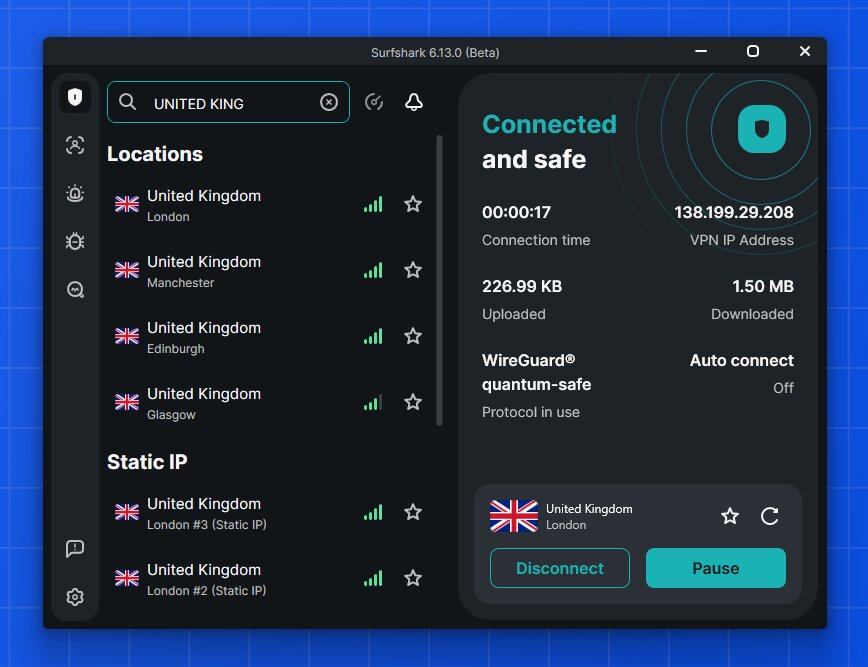
I’ve used Surfshark to unblock Netflix (multiple regions), YouTube, Instagram, TikTok, Disney+, and Amazon Prime Video without any issues. The Surfshark One plan — my recommended tier — adds antivirus protection and identity alerts on top of the core VPN, which is genuinely useful on public school networks.

The unlimited device policy is another big win for students. Share one subscription with your roommates or friends and split the cost — Surfshark allows it and it dramatically drops the per-person price.

What I liked

  • Fastest VPN in my real-world tests (~95% speed retention)
  • Camouflage mode hides VPN use from school admins
  • Unlimited devices — share with friends
  • Rotating IP feature to stay ahead of IP blocks
  • Surfshark One adds antivirus and breach alerts
  • $1.99/mo on the 2-year plan is outstanding value

What I didn’t like

  • Headquartered in Netherlands (Nine Eyes jurisdiction)
  • Monthly plan is significantly more expensive

Current deal: Surfshark One plan — $1.99/mo on the 2-year plan, 87% OFF + 3 months free. See the Surfshark coupon page for the latest offers, and read my full Surfshark review for deeper testing results.

2. IPVanish — Best for Sharing With Friends, Unlimited Devices

⚡ QUICK VERDICT — IPVANISH
Unlimited Devices
IPVanish logo

IPVanish — Our verdict

Fast, budget-friendly, and great for connecting an entire dorm floor — IPVanish allows unlimited devices on one account.

  • ~92% speed retention in my tests
  • Unlimited simultaneous connections
  • Traffic obfuscation available
  • 3,200+ servers in 113 locations
  • US-based (subject to US data laws)
  • Price increases after the first year

Limited time offer

83% OFF

+ 3 GB eSIM Data Gift

Get this deal ›

30-day money-back guarantee

IPVanish is my second recommendation for school, particularly if you want to share a single subscription across an entire friend group. Like Surfshark, it offers unlimited simultaneous connections — meaning there’s no device cap. One account can cover your laptop, phone, tablet, and your roommates’ devices all at once.
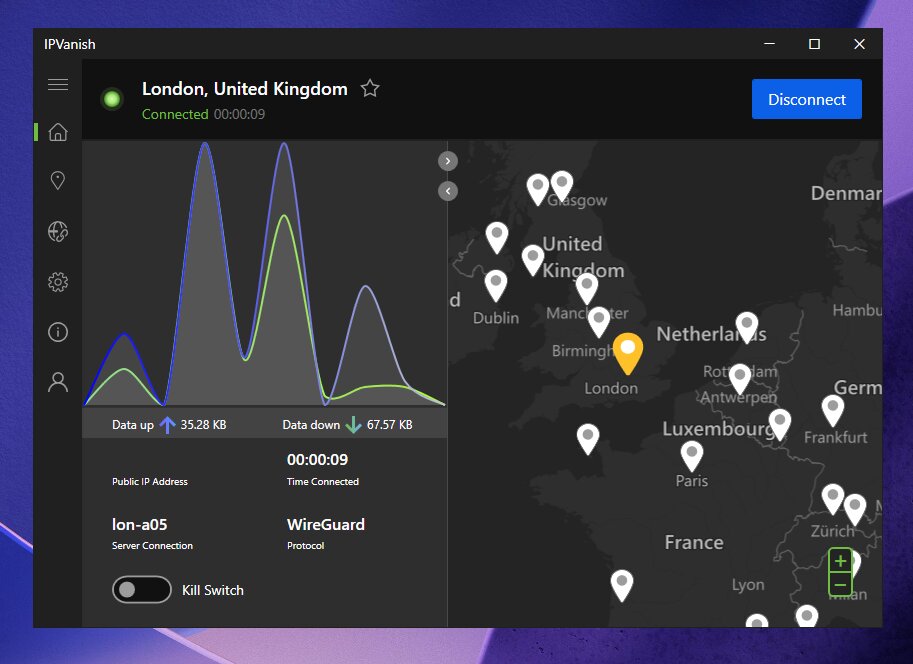
In my speed tests, IPVanish achieves around 92% speed retention, which is genuinely fast and well-suited for streaming and browsing on shared school Wi-Fi. It supports WireGuard, which helps maintain those speeds even when connected to distant servers.

IPVanish also includes traffic obfuscation and a reliable kill switch, which are the two most important features for use on school networks. I’ve tested it against various blocked platforms and it bypasses them consistently. The one caveat: IPVanish is US-based, which is worth knowing if you’re particularly privacy-conscious.

What I liked

  • Very fast speeds (~92% retention)
  • Unlimited devices — perfect for sharing
  • Traffic obfuscation included
  • $2.19/mo is a competitive price point
  • Clean, intuitive apps across all platforms

What I didn’t like

  • US-based — subject to American data jurisdiction
  • Renewal prices are higher after the promotional period

Read my full IPVanish review for complete testing details, or check the IPVanish coupon page for the latest deals.

3. Proton VPN — Best for Privacy + Solid Free Plan

⚡ QUICK VERDICT — PROTON VPN
Best for Privacy
Proton VPN logo

Proton VPN — Our verdict

Swiss-based, privacy-first VPN with a Stealth protocol designed to bypass deep packet inspection — plus a legitimate unlimited free tier.

  • ~91% speed retention on paid plans
  • Stealth protocol evades DPI and VPN blocks
  • Unlimited free plan (no data cap)
  • Swiss jurisdiction — strong privacy laws
  • Free plan limited to servers in 5 countries
  • Free plan doesn’t reliably unblock streaming

Limited time offer

70% OFF

2-year plan

Get this deal ›

30-day money-back guarantee

Proton VPN earns its spot here for two reasons: it’s the most privacy-respecting VPN on this list, and it has a genuinely usable free plan. If budget is a real constraint, Proton VPN’s free tier gives you unlimited data (just capped speeds) and servers in five countries — no credit card required.

For school use specifically, Proton VPN’s Stealth protocol is a standout feature. It’s designed to defeat deep packet inspection (DPI), the technique many school networks use to identify and block VPN traffic patterns. If a standard VPN keeps getting blocked at your school, switching to Proton VPN with Stealth enabled often fixes the problem.
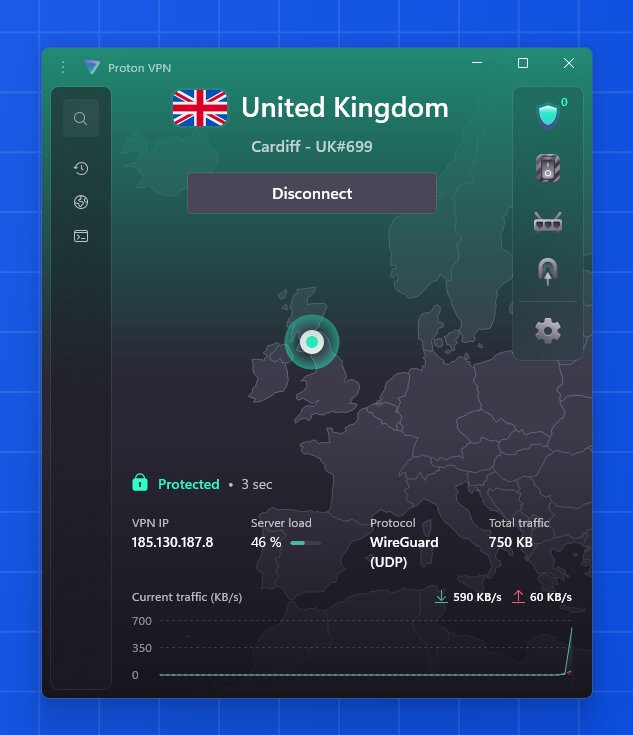
The paid plan unlocks 91% speed retention in my testing, servers across 117+ countries, and full streaming support. For students in highly restrictive environments or anyone who prioritizes privacy above everything else, Proton VPN is the right choice.

What I liked

  • Stealth protocol specifically built to beat DPI firewalls
  • Unlimited free plan with no data cap
  • Swiss jurisdiction — among the best for privacy
  • Open-source and independently audited
  • Low latency — great for video calls on school Wi-Fi

What I didn’t like

  • Free plan only covers 5 server locations
  • Streaming not reliably supported on the free tier
  • Paid plans cost more than Surfshark

See my full Proton VPN review or grab the best price on the Proton VPN coupon page.

4. NordVPN — Fast and Reliable, Though Pricier

⚡ QUICK VERDICT — NORDVPN
Fast & Reliable
NordVPN logo

NordVPN — Our verdict

One of the fastest VPNs available with a massive server network and excellent obfuscation — just pricier than Surfshark for what you get.

  • ~89% speed retention (fast, but behind Surfshark in my tests)
  • 9,300+ servers in 111 countries
  • Obfuscated servers + NordWhisper protocol
  • 10 simultaneous connections
  • More expensive than Surfshark
  • Only 10 devices vs. Surfshark’s unlimited

Limited time offer

76% OFF

+ 3 months free

Get this deal ›

30-day money-back guarantee

NordVPN is a genuinely excellent VPN — I just rank it below Surfshark because in my own testing, Surfshark is faster, allows unlimited devices, and costs less. That said, NordVPN has features worth knowing about for school use.

Its obfuscated servers mask your VPN usage effectively, and the newer NordWhisper protocol is specifically designed to avoid the traffic signatures that school network filters typically flag. If you’re in a particularly locked-down environment, NordVPN’s obfuscation tools are among the best available.

The massive server network (9,300+ across 111 countries) means you’re unlikely to ever hit a crowded server. NordVPN also refreshes IP addresses rapidly, so even if your school blocks a specific server IP, reconnecting gives you a fresh one.
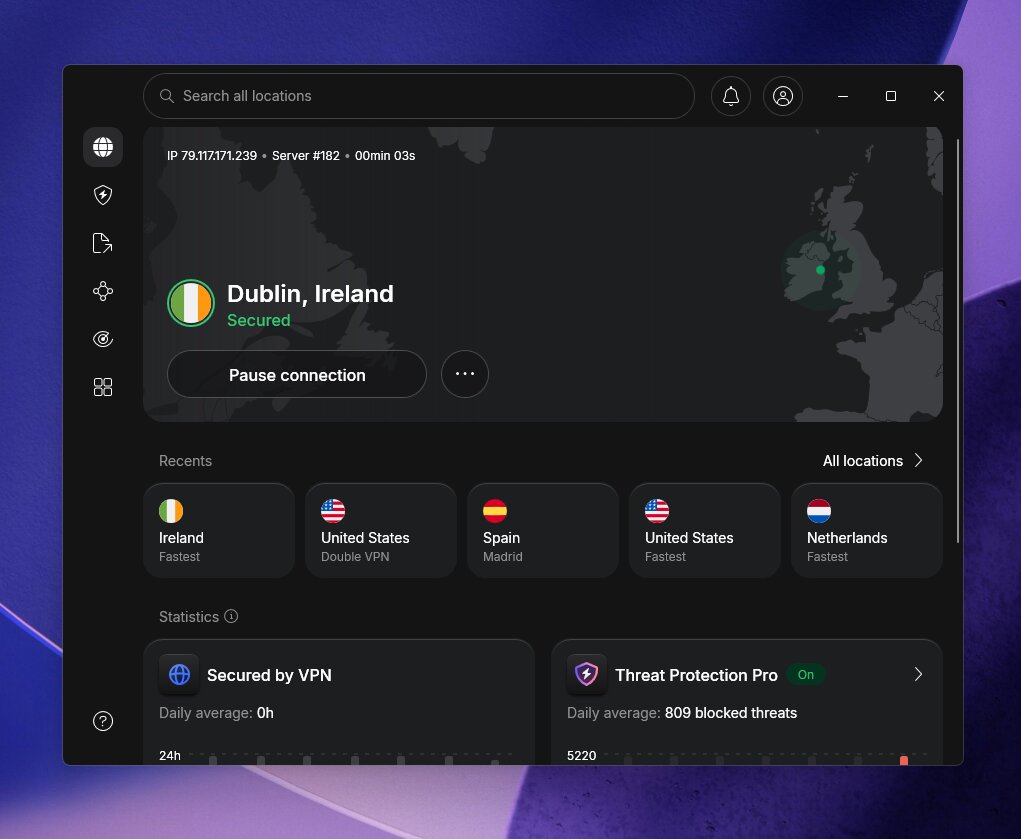
Many other sites list NordVPN as their #1 pick — often because of higher affiliate commissions. In my actual speed tests, Surfshark consistently outperforms NordVPN. I recommend NordVPN if you specifically need its Double VPN or Meshnet features, but for most school use cases, Surfshark is the better deal.

What I liked

  • Massive server fleet with rapid IP refresh
  • NordWhisper protocol for highly restrictive networks
  • Double VPN for extra-sensitive browsing
  • Meshnet for private multiplayer gaming with friends
  • Excellent streaming unblocking across all major services

What I didn’t like

  • Pricier than Surfshark for equivalent features
  • 10-device cap (Surfshark is unlimited)
  • Speed retention slightly below Surfshark in my tests

See the full NordVPN review, compare them head-to-head in my Surfshark vs NordVPN breakdown, or find the best price on the NordVPN coupon page.

5. PrivadoVPN — Best Free/Budget Option for Students

⚡ QUICK VERDICT — PRIVADOVPN
Best Free VPN
PrivadoVPN logo

PrivadoVPN — Our verdict

The best free VPN option for school — 10GB/month free, servers in 10 countries, with proper security features built in.

  • Genuinely free plan with 10GB/month data
  • Free servers in 10 countries
  • Kill switch and DNS leak protection on free plan
  • Paid plan is one of the cheapest available ($1.11/mo)
  • Speeds throttled to 1 Mbps after 10GB on free plan
  • No browser extensions

Limited time offer

90% OFF

+ 3 months free

Get this deal ›

30-day money-back guarantee

If you genuinely can’t afford a paid VPN right now, PrivadoVPN is the free option I’d point you toward. Unlike most “free” VPNs that log your data or sell it to advertisers, PrivadoVPN is a freemium product of a legitimate premium service. The free tier includes 10GB of monthly data, access to servers in 10 countries, and importantly, a proper kill switch and DNS leak protection.
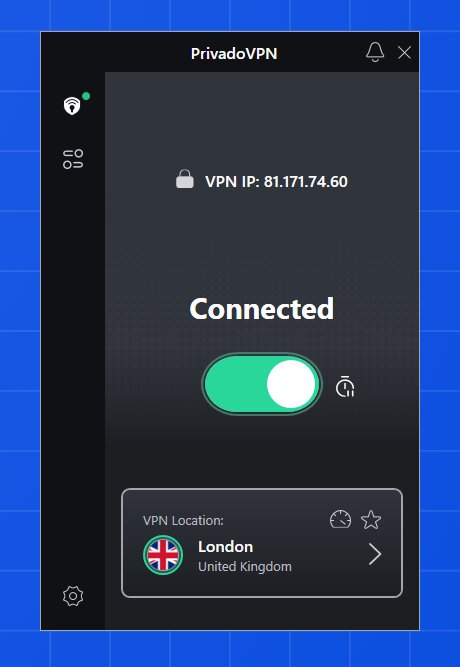
For casual school browsing — checking social media, accessing blocked YouTube content, or reading restricted websites — 10GB per month is often enough. If you run out, speeds drop to 1 Mbps rather than cutting you off entirely, so you’re still connected. The paid plan at just $1.11/mo on the 2-year deal is also the cheapest full-featured VPN I’ve tested.

What I liked

  • Legitimate free plan with no data selling
  • Kill switch and leak protection even on free tier
  • Cheapest paid plan of any VPN I’ve reviewed
  • Clean, intuitive apps

What I didn’t like

  • 10GB monthly cap on free plan limits heavy use
  • ~85% speed retention — noticeable vs. premium options
  • Streaming support is limited compared to Surfshark or NordVPN

Read my PrivadoVPN review or grab the deal on the PrivadoVPN coupon page.

6. ExpressVPN — Easiest to Use, Obfuscation on Every Server

⚡ QUICK VERDICT — EXPRESSVPN
Easiest to Use
ExpressVPN logo

ExpressVPN — Our verdict

Premium, polished, and beginner-friendly — every server includes obfuscation, making it ideal for highly restrictive school environments.

  • ~91% speed retention in my tests
  • Obfuscation built into every server (no separate toggle)
  • Servers in 105 countries
  • Extremely beginner-friendly apps
  • Most expensive option on this list
  • Owned by Kape Technologies — worth knowing

Limited time offer

78% OFF

+ 4 months free

Get this deal ›

30-day money-back guarantee

ExpressVPN is the most polished VPN I’ve used — the apps are clean, the one-tap connection experience is seamless, and it genuinely works for someone picking up a VPN for the first time. If you’re helping a friend or family member set up a VPN and they’re not tech-savvy, ExpressVPN is what I’d hand them.

What makes it particularly useful for school is that obfuscation is active on every single server by default — you don’t need to find a special server or flip a toggle. If your school is blocking VPN traffic, ExpressVPN handles it automatically.
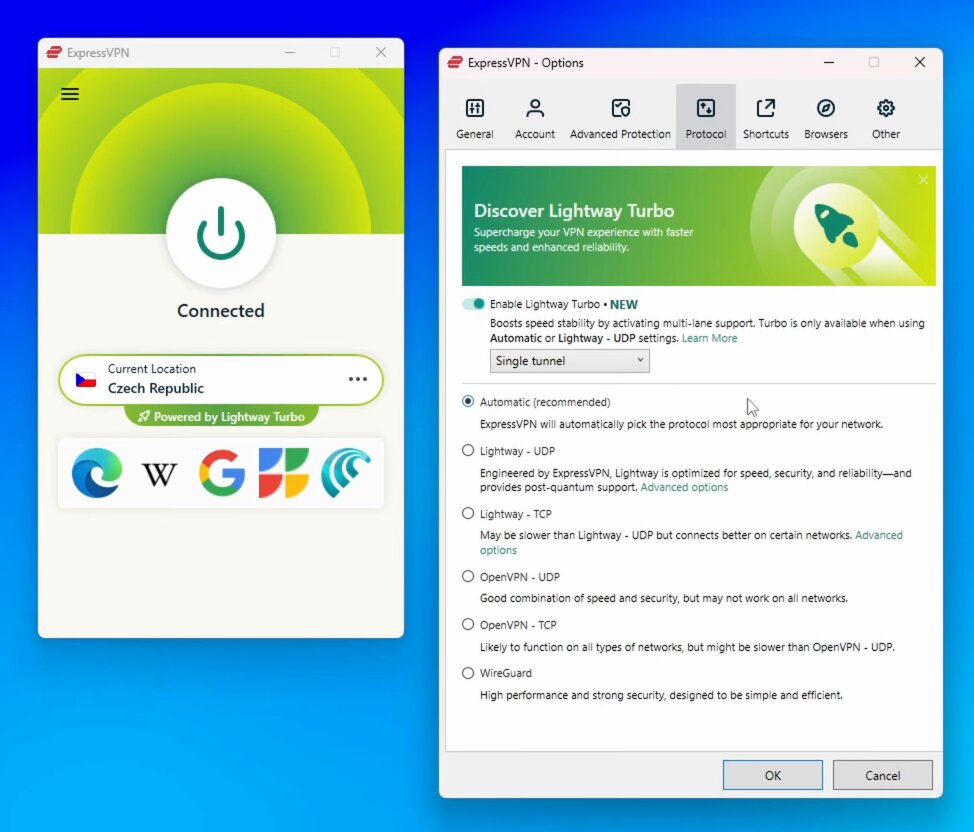
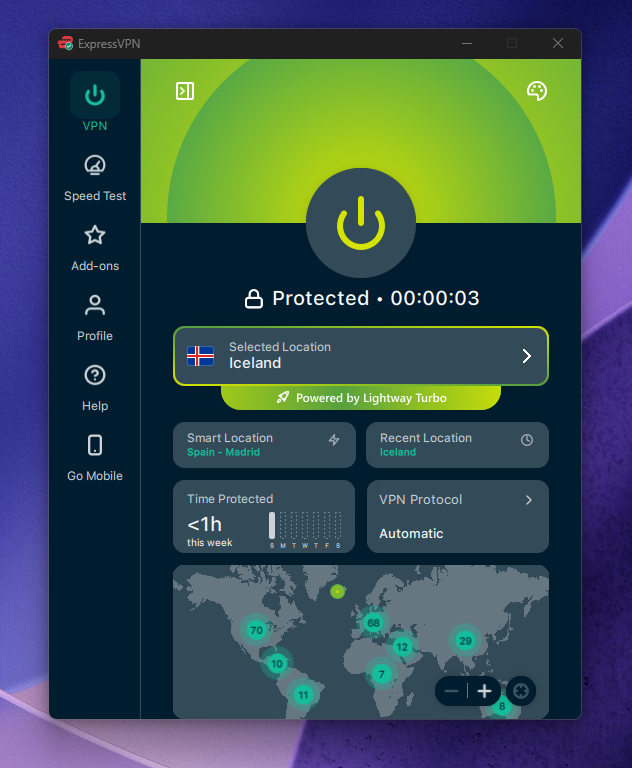
One thing I disclose transparently: ExpressVPN is owned by Kape Technologies, a company that also owns CyberGhost and PIA. Kape has an older history in adware (under a different company name), though ExpressVPN itself operates independently with a verified no-logs policy. It’s worth knowing before you subscribe.

What I liked

  • Easiest app experience of any VPN I’ve tested
  • Obfuscation on all servers with no manual configuration
  • Fast and consistent speeds (~91% retention)
  • Excellent streaming unblocking
  • Up to 14 devices on higher-tier plans

What I didn’t like

  • Priciest option on this list at $2.79/mo
  • Owned by Kape Technologies (see note above)

Read the full ExpressVPN review or find the latest discount on the ExpressVPN coupon page.

7. CyberGhost — 45-Day Money-Back Guarantee, Great for Beginners

⚡ QUICK VERDICT — CYBERGHOST
45-Day Guarantee
CyberGhost logo

CyberGhost — Our verdict

Budget-friendly, beginner-friendly, and backed by the most generous refund window of any VPN I’ve tested — 45 days on long-term plans.

  • 45-day money-back guarantee on 2-year plan
  • Dedicated streaming-optimized servers
  • Super beginner-friendly apps
  • Servers in 100 countries
  • ~88% speed retention — slightly behind the top options
  • Owned by Kape Technologies
  • No obfuscation support

Limited time offer

87% OFF

+ 2 months free

Get this deal ›

45-day money-back guarantee (2-year plan)

CyberGhost is a solid pick if you’re new to VPNs and want something simple to set up, or if you want the longest risk-free window to try a VPN before committing. The 45-day money-back guarantee on the 2-year plan is the most generous in the industry — nearly every other VPN caps it at 30 days.

The dedicated streaming servers are a genuine differentiator: CyberGhost maintains separate server categories optimised for Netflix, iPlayer, Disney+, and others, with frequently refreshed IPs to stay ahead of streaming platform blocks.
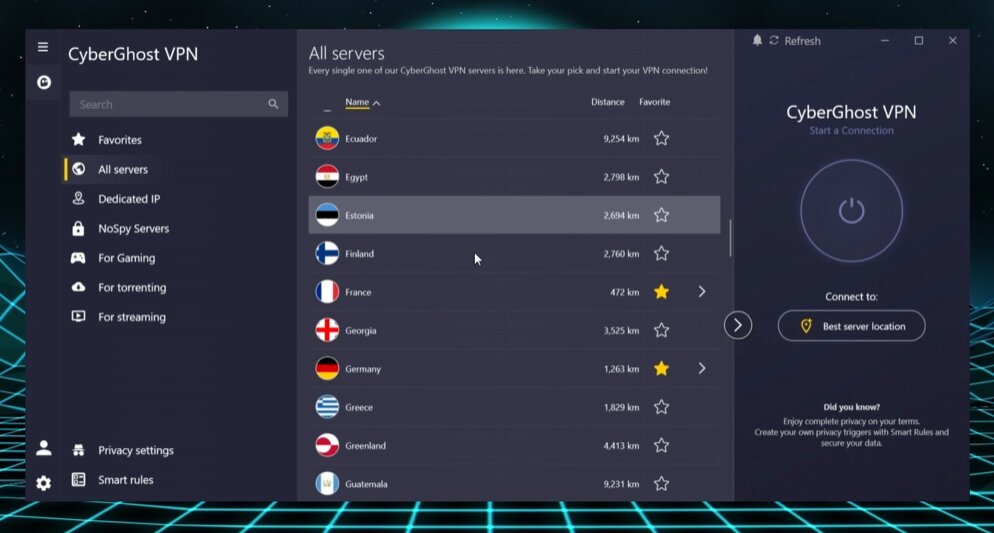
The main limitation for school use is the lack of obfuscation. If your school has basic IP blocks, CyberGhost will work fine. If the network actively detects and blocks VPN traffic patterns, you’ll need Surfshark, Proton VPN, or ExpressVPN instead. Like ExpressVPN, CyberGhost is also owned by Kape Technologies — worth disclosing.

What I liked

  • 45-day money-back guarantee — best in class
  • Dedicated streaming servers with frequent IP refreshes
  • Very easy to navigate, great for first-time VPN users
  • $1.75/mo is genuinely affordable

What I didn’t like

  • No obfuscation — can be blocked on strict school networks
  • Speed retention (~88%) behind Surfshark and IPVanish
  • Owned by Kape Technologies

Full details in my CyberGhost review or the CyberGhost coupon page.

8. VeePN — Budget Streaming VPN

⚡ QUICK VERDICT — VEEPN
Budget Streaming
VeePN logo

VeePN — Our verdict

A budget-friendly option that handles streaming well and includes obfuscation — worth considering if you’re on a very tight budget.

  • ~88% speed retention in testing
  • Obfuscation (NetGuard feature) included
  • Competitive $1.99/mo deal on 2-year plan
  • 10 simultaneous connections
  • Smaller server network than Surfshark or NordVPN
  • Less independently audited than top-tier options

Limited time offer

83% OFF

+ 4 months free

Get this deal ›

30-day money-back guarantee

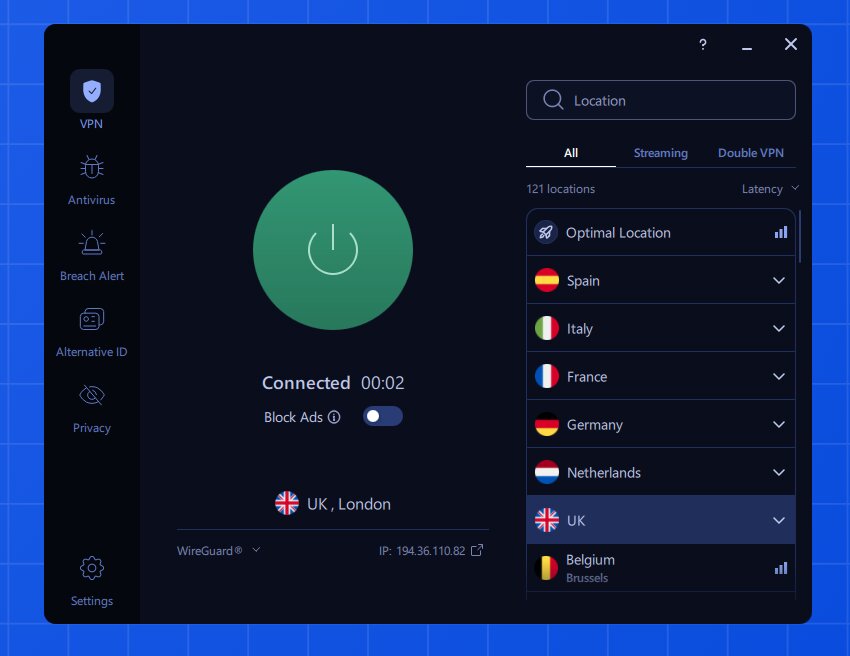
VeePN rounds out this list as a decent budget option for streaming on school networks. It handles the basics well — bypassing geo-restrictions, decent speeds, obfuscation through its NetGuard feature. It’s not my first recommendation over Surfshark (which costs the same and is significantly faster), but it’s a legitimate option if you’ve already come across a deal.
For more on how VeePN stacks up, see my VeePN review and the VeePN coupon page.

VPN Comparison Table — Best VPNs for School 2026

VPN Speed Retention Obfuscation Devices Starting Price Money-Back
Surfshark ⭐ Editor’s Pick ~95% ✅ Yes Unlimited $1.99/mo 30 days
IPVanish ~92% ✅ Yes Unlimited $2.19/mo 30 days
Proton VPN ~91% ✅ Stealth 10 Free / $2.99/mo 30 days
NordVPN ~89% ✅ Yes 10 $3.59/mo 30 days
PrivadoVPN ~85% ❌ No 10 Free / $1.11/mo 30 days
ExpressVPN ~91% ✅ All servers 14 $2.79/mo 30 days
CyberGhost ~88% ❌ No 7 $1.75/mo 45 days
VeePN ~88% ✅ Yes 10 $1.99/mo 30 days

How I Tested These VPNs for School

I’ve published over 500 VPN videos across my two YouTube channels (AllThingsVPN and VPNR), and I test VPNs continuously across real restricted networks. Here’s what I specifically looked for when building this school VPN list:

1

Firewall bypass testing

I tested each VPN against blocked platforms including YouTube, TikTok, Instagram, and Netflix. I specifically checked whether they could handle IP blocks, port blocks, and DPI-based VPN detection.

2

Speed retention

I measured how much speed each VPN retains compared to a raw connection. On school Wi-Fi where bandwidth is shared, minimising speed loss matters a lot. Surfshark came out on top at ~95%.

3

Obfuscation and traffic hiding

I specifically prioritised VPNs with traffic obfuscation — the ability to disguise VPN traffic as normal HTTPS traffic. This is critical for schools that actively block VPN usage rather than just individual websites.

4

Security basics

I ran DNS leak tests, WebRTC leak checks, and verified kill switch behaviour on each VPN. All VPNs on this list passed with no leaks detected.

5

Value for students

I weighted affordable long-term plans, device limits, and free tier availability heavily — because budget matters for students.

How to Set Up a VPN for School Wi-Fi

If your school blocks VPN download sites, grab the installation file at home and transfer it via USB drive to your school device. This is the most reliable workaround.

1

Choose and sign up for a VPN

My recommendation is Surfshark on the Surfshark One plan. Sign up at home on your personal network before you go to school.

2

Download the app

Download the app for your device (Windows, macOS, Android, iOS) while on your home network. If you need it on a school device, copy the installer file to a USB drive.

3

Install and log in

Install the VPN, log in with your account credentials, and open the app.

4

Enable obfuscation (if needed)

In Surfshark, select the OpenVPN protocol to automatically activate camouflage mode. In Proton VPN, switch to the Stealth protocol. This hides your VPN use from the school network.

5

Connect and browse

Hit the connect button to join the nearest fast server. Browse freely. If a server gets blocked, simply reconnect for a new IP address.

Can Schools Block VPNs?

Yes — and many do. School networks use a few different techniques. The most common is IP blocking: the network admin maintains a list of known VPN server IP addresses and blocks connections to them. The fix is simple: reconnect to the same server to get a fresh IP, or switch to a different server location.

More sophisticated networks use deep packet inspection (DPI) — a technique that analyses the pattern of your traffic to identify VPN signatures, regardless of the IP address. Standard VPN protocols like WireGuard or OpenVPN have recognisable traffic fingerprints. This is where obfuscation becomes essential. VPNs like Surfshark (camouflage mode), Proton VPN (Stealth protocol), and ExpressVPN (all-server obfuscation) make your traffic look like ordinary HTTPS browsing, defeating DPI-based detection.

If your VPN keeps getting blocked, try these steps in order:

  1. Reconnect to the same server (refreshes your IP)
  2. Switch to a different server location
  3. Enable obfuscation / switch to the OpenVPN or Stealth protocol
  4. Try a different VPN — if yours has no obfuscation (like CyberGhost), you may need to upgrade

Should You Use a Free VPN for School?

I’d caution against most free VPNs. The ones with no legitimate business model — no paid tier, no parent company — often sustain themselves by logging and selling user data to advertisers or data brokers. On a school network, that’s particularly risky.

The exceptions are freemium tiers from legitimate premium VPN companies. Proton VPN’s free plan is the gold standard here: unlimited data, no logs, and a privacy-first Swiss jurisdiction. PrivadoVPN’s free plan is also solid at 10GB/month with proper security features included. Both are backed by paid services that have no incentive to monetise your data.

Avoid random free VPNs you find on app stores with no known parent company. Some are outright malware. Others sell your browsing data. The 30-day money-back guarantees on paid VPNs are your best way to try a premium service for free.

Is Using a VPN at School Legal?

VPNs are legal in the vast majority of countries. Using one at school is not a criminal act in any jurisdiction I’m aware of. That said, your school’s acceptable use policy may prohibit VPN usage — meaning using one could get you in trouble with school administration, even if it’s not illegal.

If you use a VPN with obfuscation enabled, the network admin typically cannot tell you’re using one. That said, I’d always encourage checking your school’s internet use policy before proceeding.

Frequently Asked Questions

What is the best VPN to use at school in 2026?

Based on my testing, Surfshark is the best VPN for school. It’s the fastest VPN I’ve tested (~95% speed retention), includes camouflage mode to hide VPN use from school networks, allows unlimited devices, and costs just $1.99/mo on the 2-year Surfshark One plan. It unblocks virtually every streaming platform and social media site without issues.

Can a school detect that I’m using a VPN?

Without obfuscation, yes — school networks can detect VPN traffic patterns using deep packet inspection (DPI). With obfuscation enabled, your VPN traffic looks like regular HTTPS web traffic and is much harder to detect. Surfshark’s camouflage mode, Proton VPN’s Stealth protocol, and ExpressVPN’s all-server obfuscation are the best options for bypassing VPN detection.

What is the best free VPN for school?

Proton VPN’s free plan is the best free VPN for school. It offers unlimited data (with reduced speeds), servers in five countries, and a Stealth protocol that bypasses VPN traffic blocks — all with a legitimate no-logs policy backed by Swiss privacy law. PrivadoVPN is a solid second option with 10GB/month free and proper security features included.

My VPN keeps getting blocked at school — what should I do?

Try these steps in order: (1) Reconnect to the same server to get a fresh IP address. (2) Switch to a different server location. (3) Enable obfuscation — in Surfshark, switch to the OpenVPN protocol; in Proton VPN, select the Stealth protocol. (4) If your VPN doesn’t have obfuscation (like CyberGhost), consider switching to one that does.

Can I share a VPN subscription with my friends at school?

Yes, if you choose a VPN with unlimited simultaneous connections. Both Surfshark and IPVanish allow unlimited devices on one subscription, making it easy — and affordable — to split the cost with friends. Just be mindful of the VPN’s fair use policy and don’t share it across an unreasonably large group.

Is it safe to use a VPN on a school computer?

I’d recommend only installing a VPN on your personal device, not a school-issued computer. School devices may have monitoring software installed, and installing third-party apps is often against school policy. Use a VPN on your personal laptop or phone instead — you can hotspot from your phone to your own device if needed.

Does a VPN slow down your internet at school?

A small speed reduction is normal with any VPN, but a good one keeps it minimal. Surfshark retains ~95% of your original speed in my tests, which is practically unnoticeable. On a congested school network, a VPN can actually feel faster for some activities because it prevents bandwidth throttling by the network admin.

Are VPNs legal at school?

Using a VPN is legal in most countries. However, your school’s acceptable use policy may prohibit it — which could result in disciplinary action from school administration, even if it’s not a legal violation. Using a VPN with obfuscation makes it much harder for the network admin to detect. Always review your school’s internet policy before using a VPN.

CURRENT SURFSHARK DEAL
87% OFF
Surfshark logo

Surfshark One — Editor’s Choice

The fastest VPN for school — with obfuscation, unlimited devices, antivirus, and the best price-to-performance ratio I’ve tested.

~95% Speed Retention
Unlimited Devices
Traffic Obfuscation
Antivirus Included
4,500+ Servers

2-year plan

$1.99/mo

30-day money-back

Get Surfshark ›

Details on the Surfshark coupon page

Read next

  • Full Surfshark Review — My In-Depth Testing Results
  • Surfshark vs NordVPN — Which Is Actually Faster?
  • Best VPN for Amazon Prime Video in 2026
  • Best VPN for Firestick in 2026
  • Proton VPN Review — Is the Free Plan Worth It?
  • PrivadoVPN Review — Best Free VPN for Casual Users?

“`

You might also like

Best VPN for India

Best VPN for India in 2026: Tested & Ranked (Indian Servers That Work)

May 20, 2026
Best VPN for iPhone

Best VPN for iPhone in 2026: Tested & Ranked

May 19, 2026
Best VPN for Roblox

Best VPN for Roblox in 2026: Unblock, Play Faster & Stay Safe

May 19, 2026
Best VPN for Stake

Best VPN for Stake in 2026: Access Stake.com from the US & Anywhere

May 19, 2026
ℹ

This page contains affiliate links. If you purchase a VPN through our links we may earn a commission at no extra cost to you. This never influences our reviews or rankings.

School and college networks block more than you’d think — social media, streaming platforms, YouTube, sometimes even Google services. After spending years testing VPNs across hundreds of videos on my YouTube channel, I know exactly which ones hold up on restrictive networks and which ones fall flat. In this guide, I’ll walk you through the best VPNs for school in 2026, based on my hands-on testing.

Short on time? My top pick for school is Surfshark — it’s the fastest VPN I’ve tested, it has traffic obfuscation to hide your VPN use, and the Surfshark One plan gives you incredible value at just $1.99/mo on the 2-year deal.

The Best VPNs for School in 2026 — Quick List

  1. Surfshark — Best overall VPN for school (fastest speeds + best value)
  2. IPVanish — Best for unlimited devices, great for sharing with friends
  3. Proton VPN — Best for privacy + has a solid free plan
  4. NordVPN — Fast and reliable, though pricier
  5. PrivadoVPN — Best free/budget option for casual use
  6. ExpressVPN — Easiest to use, obfuscation on every server
  7. CyberGhost — Great 45-day money-back guarantee, beginner-friendly
  8. VeePN — Solid budget pick for streaming on a tight budget

Why Do Schools Block Websites?

Schools and universities restrict internet access for a few main reasons. First, they want to reduce distractions — blocking social media, streaming services, and gaming sites keeps students focused during class. Second, school networks have limited bandwidth, and hundreds of students streaming simultaneously can bring the whole network down. Third, network admins filter content for cybersecurity reasons: malware-infected downloads and phishing sites pose real risks to shared infrastructure.

The problem is that these blocks often go too far. YouTube is blocked on many school networks despite being one of the most valuable educational resources available. That’s where a good VPN comes in.

The Best VPNs for School — Detailed Reviews

1. Surfshark — Best Overall VPN for School in 2026

⚡ QUICK VERDICT — SURFSHARK
Best Overall Value
Surfshark logo

Surfshark — Our verdict

The fastest VPN I’ve tested, with obfuscation, unlimited devices, and an unbeatable price on the Surfshark One plan.

  • ~95% speed retention — fastest in my tests
  • Traffic obfuscation (camouflage mode)
  • Unlimited simultaneous connections
  • 4,500+ servers in 100 countries
  • Unblocks Netflix, Disney+, YouTube and more
  • Based in the Netherlands (Nine Eyes country)

Limited time offer

87% OFF

+ 3 months free

Get this deal ›

30-day money-back guarantee

Surfshark is my number one recommendation for school use, and it’s not a close call. In my testing across hundreds of VPN sessions, Surfshark consistently achieves around 95% speed retention — meaning you lose almost nothing when connected. For a school environment where bandwidth is already shared and limited, that matters a lot.

What makes Surfshark ideal for school networks specifically is its camouflage (obfuscation) mode. When you use Surfshark on OpenVPN, it automatically hides the fact that you’re using a VPN at all. Your traffic looks like regular HTTPS traffic to the network admin. This is crucial because many schools don’t just block websites — they block VPN traffic itself.

I’ve used Surfshark to unblock Netflix (multiple regions), YouTube, Instagram, TikTok, Disney+, and Amazon Prime Video without any issues. The Surfshark One plan — my recommended tier — adds antivirus protection and identity alerts on top of the core VPN, which is genuinely useful on public school networks.

The unlimited device policy is another big win for students. Share one subscription with your roommates or friends and split the cost — Surfshark allows it and it dramatically drops the per-person price.

What I liked

  • Fastest VPN in my real-world tests (~95% speed retention)
  • Camouflage mode hides VPN use from school admins
  • Unlimited devices — share with friends
  • Rotating IP feature to stay ahead of IP blocks
  • Surfshark One adds antivirus and breach alerts
  • $1.99/mo on the 2-year plan is outstanding value

What I didn’t like

  • Headquartered in Netherlands (Nine Eyes jurisdiction)
  • Monthly plan is significantly more expensive

Current deal: Surfshark One plan — $1.99/mo on the 2-year plan, 87% OFF + 3 months free. See the Surfshark coupon page for the latest offers, and read my full Surfshark review for deeper testing results.

2. IPVanish — Best for Sharing With Friends, Unlimited Devices

⚡ QUICK VERDICT — IPVANISH
Unlimited Devices
IPVanish logo

IPVanish — Our verdict

Fast, budget-friendly, and great for connecting an entire dorm floor — IPVanish allows unlimited devices on one account.

  • ~92% speed retention in my tests
  • Unlimited simultaneous connections
  • Traffic obfuscation available
  • 3,200+ servers in 113 locations
  • US-based (subject to US data laws)
  • Price increases after the first year

Limited time offer

83% OFF

+ 3 GB eSIM Data Gift

Get this deal ›

30-day money-back guarantee

IPVanish is my second recommendation for school, particularly if you want to share a single subscription across an entire friend group. Like Surfshark, it offers unlimited simultaneous connections — meaning there’s no device cap. One account can cover your laptop, phone, tablet, and your roommates’ devices all at once.

In my speed tests, IPVanish achieves around 92% speed retention, which is genuinely fast and well-suited for streaming and browsing on shared school Wi-Fi. It supports WireGuard, which helps maintain those speeds even when connected to distant servers.

IPVanish also includes traffic obfuscation and a reliable kill switch, which are the two most important features for use on school networks. I’ve tested it against various blocked platforms and it bypasses them consistently. The one caveat: IPVanish is US-based, which is worth knowing if you’re particularly privacy-conscious.

What I liked

  • Very fast speeds (~92% retention)
  • Unlimited devices — perfect for sharing
  • Traffic obfuscation included
  • $2.19/mo is a competitive price point
  • Clean, intuitive apps across all platforms

What I didn’t like

  • US-based — subject to American data jurisdiction
  • Renewal prices are higher after the promotional period

Read my full IPVanish review for complete testing details, or check the IPVanish coupon page for the latest deals.

3. Proton VPN — Best for Privacy + Solid Free Plan

⚡ QUICK VERDICT — PROTON VPN
Best for Privacy
Proton VPN logo

Proton VPN — Our verdict

Swiss-based, privacy-first VPN with a Stealth protocol designed to bypass deep packet inspection — plus a legitimate unlimited free tier.

  • ~91% speed retention on paid plans
  • Stealth protocol evades DPI and VPN blocks
  • Unlimited free plan (no data cap)
  • Swiss jurisdiction — strong privacy laws
  • Free plan limited to servers in 5 countries
  • Free plan doesn’t reliably unblock streaming

Limited time offer

70% OFF

2-year plan

Get this deal ›

30-day money-back guarantee

Proton VPN earns its spot here for two reasons: it’s the most privacy-respecting VPN on this list, and it has a genuinely usable free plan. If budget is a real constraint, Proton VPN’s free tier gives you unlimited data (just capped speeds) and servers in five countries — no credit card required.

For school use specifically, Proton VPN’s Stealth protocol is a standout feature. It’s designed to defeat deep packet inspection (DPI), the technique many school networks use to identify and block VPN traffic patterns. If a standard VPN keeps getting blocked at your school, switching to Proton VPN with Stealth enabled often fixes the problem.

The paid plan unlocks 91% speed retention in my testing, servers across 117+ countries, and full streaming support. For students in highly restrictive environments or anyone who prioritizes privacy above everything else, Proton VPN is the right choice.

What I liked

  • Stealth protocol specifically built to beat DPI firewalls
  • Unlimited free plan with no data cap
  • Swiss jurisdiction — among the best for privacy
  • Open-source and independently audited
  • Low latency — great for video calls on school Wi-Fi

What I didn’t like

  • Free plan only covers 5 server locations
  • Streaming not reliably supported on the free tier
  • Paid plans cost more than Surfshark

See my full Proton VPN review or grab the best price on the Proton VPN coupon page.

4. NordVPN — Fast and Reliable, Though Pricier

⚡ QUICK VERDICT — NORDVPN
Fast & Reliable
NordVPN logo

NordVPN — Our verdict

One of the fastest VPNs available with a massive server network and excellent obfuscation — just pricier than Surfshark for what you get.

  • ~89% speed retention (fast, but behind Surfshark in my tests)
  • 9,300+ servers in 111 countries
  • Obfuscated servers + NordWhisper protocol
  • 10 simultaneous connections
  • More expensive than Surfshark
  • Only 10 devices vs. Surfshark’s unlimited

Limited time offer

76% OFF

+ 3 months free

Get this deal ›

30-day money-back guarantee

NordVPN is a genuinely excellent VPN — I just rank it below Surfshark because in my own testing, Surfshark is faster, allows unlimited devices, and costs less. That said, NordVPN has features worth knowing about for school use.

Its obfuscated servers mask your VPN usage effectively, and the newer NordWhisper protocol is specifically designed to avoid the traffic signatures that school network filters typically flag. If you’re in a particularly locked-down environment, NordVPN’s obfuscation tools are among the best available.

The massive server network (9,300+ across 111 countries) means you’re unlikely to ever hit a crowded server. NordVPN also refreshes IP addresses rapidly, so even if your school blocks a specific server IP, reconnecting gives you a fresh one.

Many other sites list NordVPN as their #1 pick — often because of higher affiliate commissions. In my actual speed tests, Surfshark consistently outperforms NordVPN. I recommend NordVPN if you specifically need its Double VPN or Meshnet features, but for most school use cases, Surfshark is the better deal.

What I liked

  • Massive server fleet with rapid IP refresh
  • NordWhisper protocol for highly restrictive networks
  • Double VPN for extra-sensitive browsing
  • Meshnet for private multiplayer gaming with friends
  • Excellent streaming unblocking across all major services

What I didn’t like

  • Pricier than Surfshark for equivalent features
  • 10-device cap (Surfshark is unlimited)
  • Speed retention slightly below Surfshark in my tests

See the full NordVPN review, compare them head-to-head in my Surfshark vs NordVPN breakdown, or find the best price on the NordVPN coupon page.

5. PrivadoVPN — Best Free/Budget Option for Students

⚡ QUICK VERDICT — PRIVADOVPN
Best Free VPN
PrivadoVPN logo

PrivadoVPN — Our verdict

The best free VPN option for school — 10GB/month free, servers in 10 countries, with proper security features built in.

  • Genuinely free plan with 10GB/month data
  • Free servers in 10 countries
  • Kill switch and DNS leak protection on free plan
  • Paid plan is one of the cheapest available ($1.11/mo)
  • Speeds throttled to 1 Mbps after 10GB on free plan
  • No browser extensions

Limited time offer

90% OFF

+ 3 months free

Get this deal ›

30-day money-back guarantee

If you genuinely can’t afford a paid VPN right now, PrivadoVPN is the free option I’d point you toward. Unlike most “free” VPNs that log your data or sell it to advertisers, PrivadoVPN is a freemium product of a legitimate premium service. The free tier includes 10GB of monthly data, access to servers in 10 countries, and importantly, a proper kill switch and DNS leak protection.

For casual school browsing — checking social media, accessing blocked YouTube content, or reading restricted websites — 10GB per month is often enough. If you run out, speeds drop to 1 Mbps rather than cutting you off entirely, so you’re still connected. The paid plan at just $1.11/mo on the 2-year deal is also the cheapest full-featured VPN I’ve tested.

What I liked

  • Legitimate free plan with no data selling
  • Kill switch and leak protection even on free tier
  • Cheapest paid plan of any VPN I’ve reviewed
  • Clean, intuitive apps

What I didn’t like

  • 10GB monthly cap on free plan limits heavy use
  • ~85% speed retention — noticeable vs. premium options
  • Streaming support is limited compared to Surfshark or NordVPN

Read my PrivadoVPN review or grab the deal on the PrivadoVPN coupon page.

6. ExpressVPN — Easiest to Use, Obfuscation on Every Server

⚡ QUICK VERDICT — EXPRESSVPN
Easiest to Use
ExpressVPN logo

ExpressVPN — Our verdict

Premium, polished, and beginner-friendly — every server includes obfuscation, making it ideal for highly restrictive school environments.

  • ~91% speed retention in my tests
  • Obfuscation built into every server (no separate toggle)
  • Servers in 105 countries
  • Extremely beginner-friendly apps
  • Most expensive option on this list
  • Owned by Kape Technologies — worth knowing

Limited time offer

78% OFF

+ 4 months free

Get this deal ›

30-day money-back guarantee

ExpressVPN is the most polished VPN I’ve used — the apps are clean, the one-tap connection experience is seamless, and it genuinely works for someone picking up a VPN for the first time. If you’re helping a friend or family member set up a VPN and they’re not tech-savvy, ExpressVPN is what I’d hand them.

What makes it particularly useful for school is that obfuscation is active on every single server by default — you don’t need to find a special server or flip a toggle. If your school is blocking VPN traffic, ExpressVPN handles it automatically.

One thing I disclose transparently: ExpressVPN is owned by Kape Technologies, a company that also owns CyberGhost and PIA. Kape has an older history in adware (under a different company name), though ExpressVPN itself operates independently with a verified no-logs policy. It’s worth knowing before you subscribe.

What I liked

  • Easiest app experience of any VPN I’ve tested
  • Obfuscation on all servers with no manual configuration
  • Fast and consistent speeds (~91% retention)
  • Excellent streaming unblocking
  • Up to 14 devices on higher-tier plans

What I didn’t like

  • Priciest option on this list at $2.79/mo
  • Owned by Kape Technologies (see note above)

Read the full ExpressVPN review or find the latest discount on the ExpressVPN coupon page.

7. CyberGhost — 45-Day Money-Back Guarantee, Great for Beginners

⚡ QUICK VERDICT — CYBERGHOST
45-Day Guarantee
CyberGhost logo

CyberGhost — Our verdict

Budget-friendly, beginner-friendly, and backed by the most generous refund window of any VPN I’ve tested — 45 days on long-term plans.

  • 45-day money-back guarantee on 2-year plan
  • Dedicated streaming-optimized servers
  • Super beginner-friendly apps
  • Servers in 100 countries
  • ~88% speed retention — slightly behind the top options
  • Owned by Kape Technologies
  • No obfuscation support

Limited time offer

87% OFF

+ 2 months free

Get this deal ›

45-day money-back guarantee (2-year plan)

CyberGhost is a solid pick if you’re new to VPNs and want something simple to set up, or if you want the longest risk-free window to try a VPN before committing. The 45-day money-back guarantee on the 2-year plan is the most generous in the industry — nearly every other VPN caps it at 30 days.

The dedicated streaming servers are a genuine differentiator: CyberGhost maintains separate server categories optimised for Netflix, iPlayer, Disney+, and others, with frequently refreshed IPs to stay ahead of streaming platform blocks.

The main limitation for school use is the lack of obfuscation. If your school has basic IP blocks, CyberGhost will work fine. If the network actively detects and blocks VPN traffic patterns, you’ll need Surfshark, Proton VPN, or ExpressVPN instead. Like ExpressVPN, CyberGhost is also owned by Kape Technologies — worth disclosing.

What I liked

  • 45-day money-back guarantee — best in class
  • Dedicated streaming servers with frequent IP refreshes
  • Very easy to navigate, great for first-time VPN users
  • $1.75/mo is genuinely affordable

What I didn’t like

  • No obfuscation — can be blocked on strict school networks
  • Speed retention (~88%) behind Surfshark and IPVanish
  • Owned by Kape Technologies

Full details in my CyberGhost review or the CyberGhost coupon page.

8. VeePN — Budget Streaming VPN

⚡ QUICK VERDICT — VEEPN
Budget Streaming
VeePN logo

VeePN — Our verdict

A budget-friendly option that handles streaming well and includes obfuscation — worth considering if you’re on a very tight budget.

  • ~88% speed retention in testing
  • Obfuscation (NetGuard feature) included
  • Competitive $1.99/mo deal on 2-year plan
  • 10 simultaneous connections
  • Smaller server network than Surfshark or NordVPN
  • Less independently audited than top-tier options

Limited time offer

83% OFF

+ 4 months free

Get this deal ›

30-day money-back guarantee

VeePN rounds out this list as a decent budget option for streaming on school networks. It handles the basics well — bypassing geo-restrictions, decent speeds, obfuscation through its NetGuard feature. It’s not my first recommendation over Surfshark (which costs the same and is significantly faster), but it’s a legitimate option if you’ve already come across a deal.

For more on how VeePN stacks up, see my VeePN review and the VeePN coupon page.

VPN Comparison Table — Best VPNs for School 2026

VPN Speed Retention Obfuscation Devices Starting Price Money-Back
Surfshark ⭐ Editor’s Pick ~95% ✅ Yes Unlimited $1.99/mo 30 days
IPVanish ~92% ✅ Yes Unlimited $2.19/mo 30 days
Proton VPN ~91% ✅ Stealth 10 Free / $2.99/mo 30 days
NordVPN ~89% ✅ Yes 10 $3.59/mo 30 days
PrivadoVPN ~85% ❌ No 10 Free / $1.11/mo 30 days
ExpressVPN ~91% ✅ All servers 14 $2.79/mo 30 days
CyberGhost ~88% ❌ No 7 $1.75/mo 45 days
VeePN ~88% ✅ Yes 10 $1.99/mo 30 days

How I Tested These VPNs for School

I’ve published over 500 VPN videos across my two YouTube channels (AllThingsVPN and VPNR), and I test VPNs continuously across real restricted networks. Here’s what I specifically looked for when building this school VPN list:

1

Firewall bypass testing

I tested each VPN against blocked platforms including YouTube, TikTok, Instagram, and Netflix. I specifically checked whether they could handle IP blocks, port blocks, and DPI-based VPN detection.

2

Speed retention

I measured how much speed each VPN retains compared to a raw connection. On school Wi-Fi where bandwidth is shared, minimising speed loss matters a lot. Surfshark came out on top at ~95%.

3

Obfuscation and traffic hiding

I specifically prioritised VPNs with traffic obfuscation — the ability to disguise VPN traffic as normal HTTPS traffic. This is critical for schools that actively block VPN usage rather than just individual websites.

4

Security basics

I ran DNS leak tests, WebRTC leak checks, and verified kill switch behaviour on each VPN. All VPNs on this list passed with no leaks detected.

5

Value for students

I weighted affordable long-term plans, device limits, and free tier availability heavily — because budget matters for students.

How to Set Up a VPN for School Wi-Fi

If your school blocks VPN download sites, grab the installation file at home and transfer it via USB drive to your school device. This is the most reliable workaround.

1

Choose and sign up for a VPN

My recommendation is Surfshark on the Surfshark One plan. Sign up at home on your personal network before you go to school.

2

Download the app

Download the app for your device (Windows, macOS, Android, iOS) while on your home network. If you need it on a school device, copy the installer file to a USB drive.

3

Install and log in

Install the VPN, log in with your account credentials, and open the app.

4

Enable obfuscation (if needed)

In Surfshark, select the OpenVPN protocol to automatically activate camouflage mode. In Proton VPN, switch to the Stealth protocol. This hides your VPN use from the school network.

5

Connect and browse

Hit the connect button to join the nearest fast server. Browse freely. If a server gets blocked, simply reconnect for a new IP address.

Can Schools Block VPNs?

Yes — and many do. School networks use a few different techniques. The most common is IP blocking: the network admin maintains a list of known VPN server IP addresses and blocks connections to them. The fix is simple: reconnect to the same server to get a fresh IP, or switch to a different server location.

More sophisticated networks use deep packet inspection (DPI) — a technique that analyses the pattern of your traffic to identify VPN signatures, regardless of the IP address. Standard VPN protocols like WireGuard or OpenVPN have recognisable traffic fingerprints. This is where obfuscation becomes essential. VPNs like Surfshark (camouflage mode), Proton VPN (Stealth protocol), and ExpressVPN (all-server obfuscation) make your traffic look like ordinary HTTPS browsing, defeating DPI-based detection.

If your VPN keeps getting blocked, try these steps in order:

  1. Reconnect to the same server (refreshes your IP)
  2. Switch to a different server location
  3. Enable obfuscation / switch to the OpenVPN or Stealth protocol
  4. Try a different VPN — if yours has no obfuscation (like CyberGhost), you may need to upgrade

Should You Use a Free VPN for School?

I’d caution against most free VPNs. The ones with no legitimate business model — no paid tier, no parent company — often sustain themselves by logging and selling user data to advertisers or data brokers. On a school network, that’s particularly risky.

The exceptions are freemium tiers from legitimate premium VPN companies. Proton VPN’s free plan is the gold standard here: unlimited data, no logs, and a privacy-first Swiss jurisdiction. PrivadoVPN’s free plan is also solid at 10GB/month with proper security features included. Both are backed by paid services that have no incentive to monetise your data.

Avoid random free VPNs you find on app stores with no known parent company. Some are outright malware. Others sell your browsing data. The 30-day money-back guarantees on paid VPNs are your best way to try a premium service for free.

Is Using a VPN at School Legal?

VPNs are legal in the vast majority of countries. Using one at school is not a criminal act in any jurisdiction I’m aware of. That said, your school’s acceptable use policy may prohibit VPN usage — meaning using one could get you in trouble with school administration, even if it’s not illegal.

If you use a VPN with obfuscation enabled, the network admin typically cannot tell you’re using one. That said, I’d always encourage checking your school’s internet use policy before proceeding.

Frequently Asked Questions

What is the best VPN to use at school in 2026?

Based on my testing, Surfshark is the best VPN for school. It’s the fastest VPN I’ve tested (~95% speed retention), includes camouflage mode to hide VPN use from school networks, allows unlimited devices, and costs just $1.99/mo on the 2-year Surfshark One plan. It unblocks virtually every streaming platform and social media site without issues.

Can a school detect that I’m using a VPN?

Without obfuscation, yes — school networks can detect VPN traffic patterns using deep packet inspection (DPI). With obfuscation enabled, your VPN traffic looks like regular HTTPS web traffic and is much harder to detect. Surfshark’s camouflage mode, Proton VPN’s Stealth protocol, and ExpressVPN’s all-server obfuscation are the best options for bypassing VPN detection.

What is the best free VPN for school?

Proton VPN’s free plan is the best free VPN for school. It offers unlimited data (with reduced speeds), servers in five countries, and a Stealth protocol that bypasses VPN traffic blocks — all with a legitimate no-logs policy backed by Swiss privacy law. PrivadoVPN is a solid second option with 10GB/month free and proper security features included.

My VPN keeps getting blocked at school — what should I do?

Try these steps in order: (1) Reconnect to the same server to get a fresh IP address. (2) Switch to a different server location. (3) Enable obfuscation — in Surfshark, switch to the OpenVPN protocol; in Proton VPN, select the Stealth protocol. (4) If your VPN doesn’t have obfuscation (like CyberGhost), consider switching to one that does.

Can I share a VPN subscription with my friends at school?

Yes, if you choose a VPN with unlimited simultaneous connections. Both Surfshark and IPVanish allow unlimited devices on one subscription, making it easy — and affordable — to split the cost with friends. Just be mindful of the VPN’s fair use policy and don’t share it across an unreasonably large group.

Is it safe to use a VPN on a school computer?

I’d recommend only installing a VPN on your personal device, not a school-issued computer. School devices may have monitoring software installed, and installing third-party apps is often against school policy. Use a VPN on your personal laptop or phone instead — you can hotspot from your phone to your own device if needed.

Does a VPN slow down your internet at school?

A small speed reduction is normal with any VPN, but a good one keeps it minimal. Surfshark retains ~95% of your original speed in my tests, which is practically unnoticeable. On a congested school network, a VPN can actually feel faster for some activities because it prevents bandwidth throttling by the network admin.

Are VPNs legal at school?

Using a VPN is legal in most countries. However, your school’s acceptable use policy may prohibit it — which could result in disciplinary action from school administration, even if it’s not a legal violation. Using a VPN with obfuscation makes it much harder for the network admin to detect. Always review your school’s internet policy before using a VPN.

CURRENT SURFSHARK DEAL
87% OFF
Surfshark logo

Surfshark One — Editor’s Choice

The fastest VPN for school — with obfuscation, unlimited devices, antivirus, and the best price-to-performance ratio I’ve tested.

~95% Speed Retention
Unlimited Devices
Traffic Obfuscation
Antivirus Included
4,500+ Servers

2-year plan

$1.99/mo

30-day money-back

Get Surfshark ›

Details on the Surfshark coupon page

Read next

  • Full Surfshark Review — My In-Depth Testing Results
  • Surfshark vs NordVPN — Which Is Actually Faster?
  • Best VPN for Amazon Prime Video in 2026
  • Best VPN for Firestick in 2026
  • Proton VPN Review — Is the Free Plan Worth It?
  • PrivadoVPN Review — Best Free VPN for Casual Users?

“`

Alfredo Vilar

Alfredo Vilar

Alfredo Vilar is a cybersecurity researcher, VPN analyst, and internet freedom advocate focused on online privacy and digital security tools. As the lead writer at AllThingsVPN, he has spent the last 4 years hands-on testing VPN services through real-world speed, streaming, security, and privacy analysis to uncover what actually works. Through detailed reviews and YouTube content, he helps people cut through marketing hype, protect their online privacy, and choose the right tools with confidence.

Related articles

Best VPN for India

Best VPN for India in 2026: Tested & Ranked (Indian Servers That Work)

by Alfredo Vilar
May 20, 2026

If you're looking for the best VPN for India in 2026, you need to know one important thing upfront: since...

Best VPN for iPhone

Best VPN for iPhone in 2026: Tested & Ranked

by Alfredo Vilar
May 19, 2026

Your iPhone is more private than most phones — but it's not invincible. Your real IP address is still exposed...

Best VPN for Roblox

Best VPN for Roblox in 2026: Unblock, Play Faster & Stay Safe

by Alfredo Vilar
May 19, 2026

Roblox is one of the most popular gaming platforms on the planet — but not everyone can access it freely....

Best VPN for Stake

Best VPN for Stake in 2026: Access Stake.com from the US & Anywhere

by Alfredo Vilar
May 19, 2026

Stake.com is one of the biggest crypto casinos and sportsbooks on the planet — but if you're in the US,...

Next Post
Best VPN Deals 2026

Best VPN Deals 2026

Recommended

Best VPN Deals 2026

Best VPN Deals 2026

May 19, 2026
Best VPN for India

Best VPN for India in 2026: Tested & Ranked (Indian Servers That Work)

May 20, 2026
Best VPN for iPhone

Best VPN for iPhone in 2026: Tested & Ranked

May 19, 2026
Best VPN for School

Best VPN for School in 2026: Bypass Restrictions & Stay Private

May 19, 2026
Best VPN for Roblox

Best VPN for Roblox in 2026: Unblock, Play Faster & Stay Safe

May 19, 2026
Best VPN for Stake

Best VPN for Stake in 2026: Access Stake.com from the US & Anywhere

May 19, 2026
Surfshark Deal

All Things VPN

We believe everyone deserves to browse the internet safely — without the jargon. All Things VPN covers VPN reviews, privacy tips, and cybersecurity guides written in plain language, so you can make confident decisions about your online security.

  • Contact
  • About Us
  • Editorial Policy
  • How we review

No Result
View All Result
  • Landing Page
  • Buy JNews
  • Support Forum
  • Pre-sale Question
  • Contact Us