This page contains affiliate links. If you purchase a VPN through our links we may earn a commission at no extra cost to you. This never influences our reviews or rankings.
If you’re looking for a free VPN for your Mac, the honest answer is: most of them aren’t worth your time. I’ve spent over two years testing 500+ VPN products across two YouTube channels, and the free VPN space is littered with privacy nightmares — apps that log your activity, inject ads, or worse, sell your data to third parties.
That said, a handful of genuinely good free options exist. In this guide, I’ve tested the best free VPNs that actually work on macOS, plus the best premium options you can try risk-free. My top pick for anyone serious about getting real value is Surfshark — it’s not free, but at $1.99/month and with a 30-day money-back guarantee, it’s the closest thing to “free” without compromising your privacy.
Best Free VPN for Mac — Quick List
- Surfshark — Best overall (7-day free trial + money-back guarantee)
- Proton VPN — Best truly free VPN (unlimited data, no ads)
- PrivadoVPN — Best free VPN for streaming (10 GB/month)
- NordVPN — Best paid alternative with a free trial
- VeePN — Budget option with a free tier
1. Surfshark — Best Free Trial VPN for Mac
Best Overall Value

Surfshark — Our verdict
The fastest VPN I’ve tested — and the best value option if you want a proper VPN experience on your Mac without committing long-term. The 7-day free trial and 30-day money-back guarantee make it effectively free to try.
- ~95% speed retention — fastest VPN I’ve tested
- Unlimited devices on one subscription
- 7-day free trial available on iOS/macOS
- Surfshark One plan adds antivirus + data breach alerts
- Not a “free” VPN — requires a subscription after trial
I know what you’re thinking — Surfshark isn’t technically free. But hear me out. It offers a 7-day free trial on iOS and macOS apps, and if you sign up for a plan, there’s a 30-day money-back guarantee. That’s up to 37 days of essentially free access.
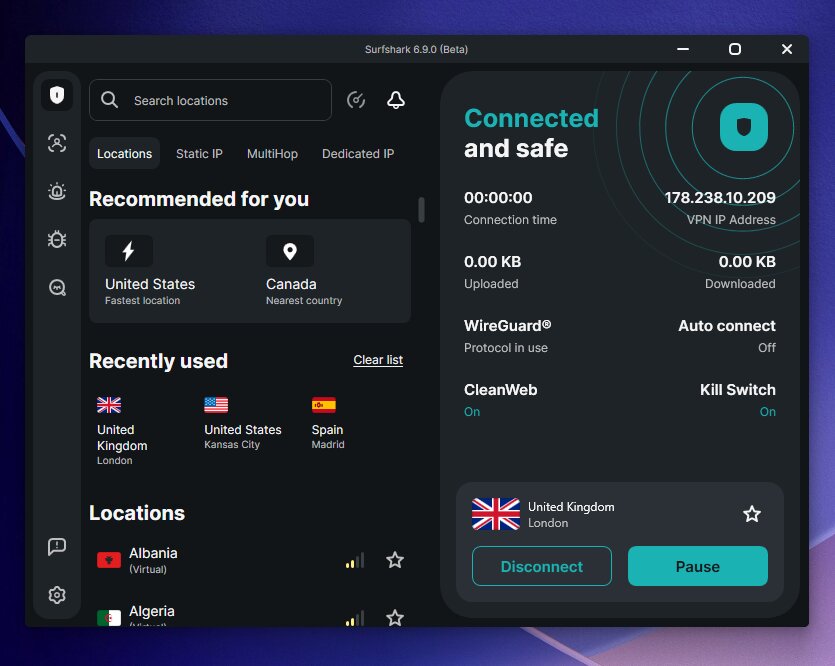
More importantly, in all my testing across 500+ VPN videos, Surfshark consistently delivers ~95% speed retention — better than NordVPN, better than ExpressVPN, and miles ahead of any free VPN I’ve tried. On my MacBook, connections were seamless and I never noticed a speed drop during everyday use.
The Surfshark One plan is what I personally recommend. It adds antivirus protection, real-time data breach monitoring, and a private search engine on top of the VPN — all for $1.99/month on the 2-year plan. That’s the best quality-to-price ratio in the entire VPN market right now.
What I liked
- Fastest VPN I’ve tested — ~95% speed retention means almost no slowdown on Mac
- Unlimited simultaneous connections — great if you have multiple Apple devices
- Clean, polished macOS app that feels native
- Surfshark One adds antivirus and breach alerts — genuinely useful extras
- 30-day money-back guarantee makes it risk-free to try
What I didn’t like
- Not a permanent free option — trial period is limited
- 7-day free trial requires a valid payment method
If you’re serious about protecting your Mac and want the best performance, Surfshark is the answer. Try it free for 7 days via the macOS or iOS app, and if it’s not for you, cancel before the trial ends.
→ Read my full Surfshark review
2. Proton VPN — Best Truly Free VPN for Mac
Best for Privacy

Proton VPN — Our verdict
The only free VPN I’d recommend without hesitation. Unlimited data, no ads, audited no-logs policy, and a Swiss jurisdiction that keeps your privacy protected. The free plan has real limitations, but it’s the most trustworthy no-cost VPN available for Mac.
- Unlimited data — no monthly cap
- Audited no-logs policy (annual third-party audits)
- No ads on the free plan
- Based in Switzerland — strong privacy jurisdiction
- Can’t choose your server — auto-assigned
- Speeds noticeably slower than paid tier
- Free plan limited to 1 device
If you want a completely free VPN for your Mac that you can actually trust, Proton VPN is my top recommendation. It’s the only free VPN service where I have zero concerns about what’s happening to my data.
What sets it apart from every other free option: unlimited data. Most free VPNs cap you at 2–10 GB per month. Proton VPN’s free tier has no limit whatsoever, which means you can use it for daily browsing without watching a counter tick down.
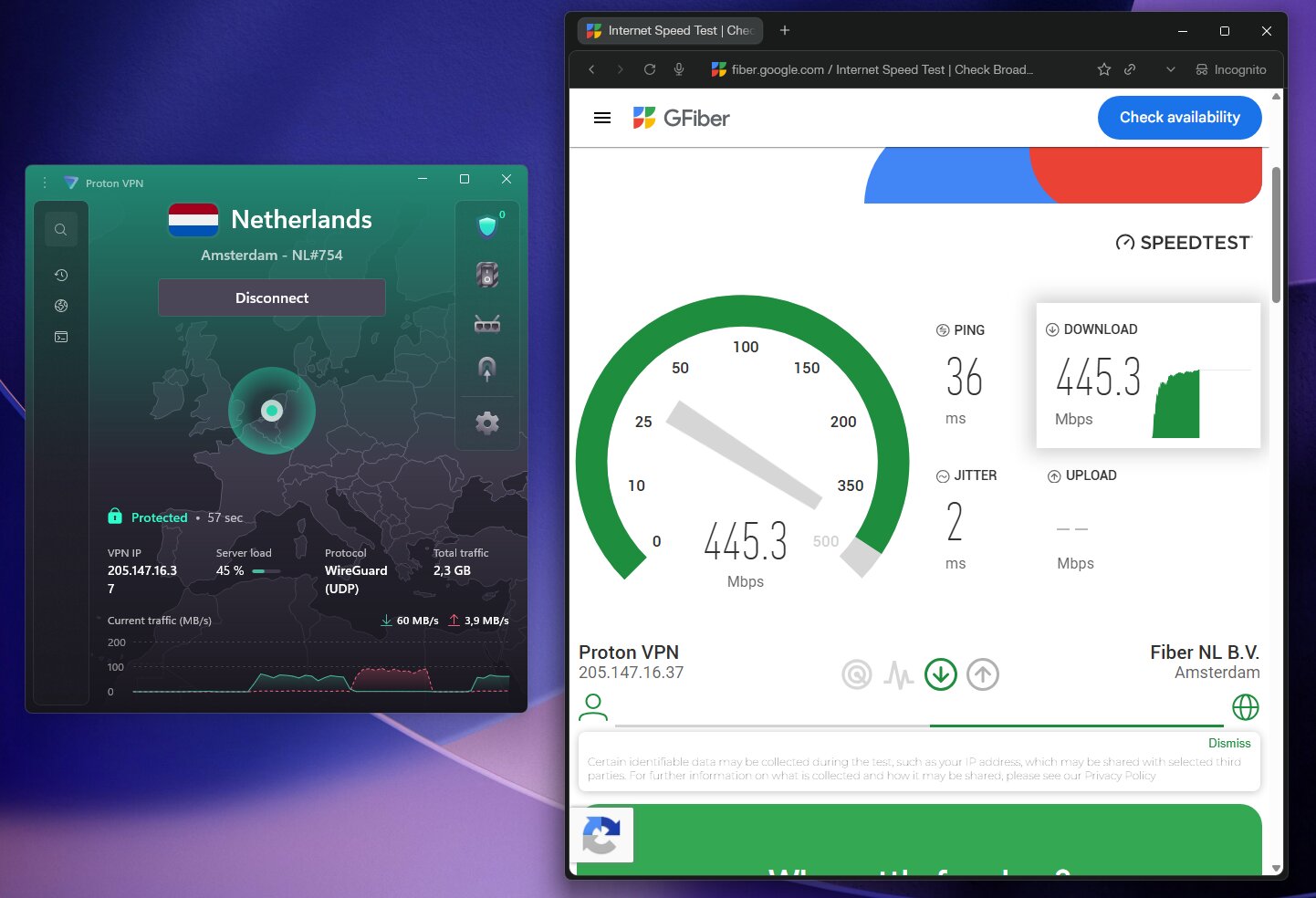
From a privacy standpoint, Proton VPN is exceptional. It’s headquartered in Switzerland, outside the Five/Nine/Fourteen Eyes alliances, and undergoes annual independent security audits. That’s a level of transparency most paid VPNs don’t bother with.
In my testing on macOS, the app is clean and well-designed. The free plan includes WireGuard and OpenVPN protocols, a kill switch, and the Stealth protocol for bypassing VPN blocks — features you normally only see on paid tiers.
The main frustration with the free plan is that you can’t choose which server to connect to. Proton VPN automatically assigns you to the optimal server, which in practice usually means a server in your region. For basic privacy protection, that’s fine — but if you need to access content from a specific country, you’ll need the paid tier.
What I liked
- Truly unlimited data — genuinely rare for a free VPN
- No ads anywhere in the app
- Annual third-party audits — the gold standard for free VPNs
- Includes the Stealth obfuscation protocol on the free tier
- Clean, polished macOS app
What I didn’t like
- No server selection on the free plan — you get what you’re given
- Speeds are significantly lower than the paid version
- Not great for streaming — geo-unblocking requires a paid plan
- Only 1 simultaneous connection on the free tier
Bottom line: If you want a free VPN for Mac that you can use every day without worrying about data limits or privacy compromises, Proton VPN is the one to get. It’s my top pick among truly free options.
→ Read my full Proton VPN review
3. PrivadoVPN — Best Free Mac VPN for Streaming
Cheapest + Best Free VPN

PrivadoVPN — Our verdict
The best free VPN if you want to unblock streaming services. PrivadoVPN’s free tier gives you 10 GB of fast data per month, 10 server locations to choose from, and solid streaming unblocking ability — all with a no-logs policy and Swiss-based privacy.
- 10 GB free data per month
- 10 server locations — you can actually choose
- Unblocks Netflix, BBC iPlayer, Hulu on free plan
- Includes split tunneling (SmartRoute) on free tier
- 10 GB cap goes fast if you’re streaming
- No-logs policy hasn’t been independently audited
PrivadoVPN fills the gap Proton VPN’s free plan leaves: you can actually choose your server, and it works with streaming services. During my testing on macOS, the free tier successfully unblocked Netflix, BBC iPlayer, and Hulu without any fiddling.
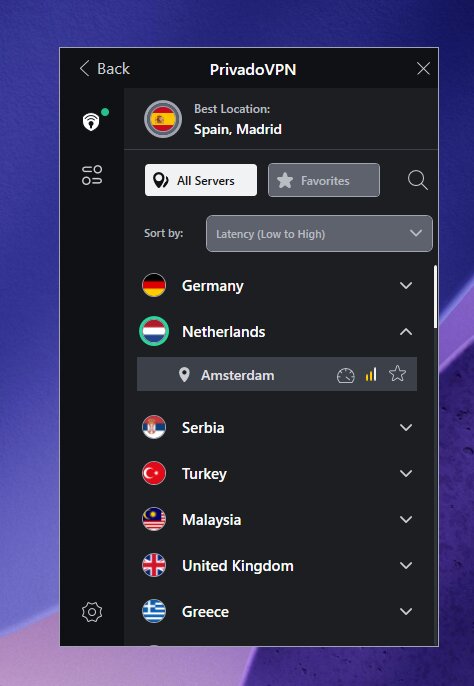
The interface on Mac is clean and beginner-friendly — I had it set up and connected within a couple of minutes. What impressed me most for a free plan was the inclusion of SmartRoute, which is essentially split tunneling. It lets you decide which apps route through the VPN tunnel and which ones don’t — a great way to conserve your 10 GB monthly allowance.
The main catch is the 10 GB monthly data cap. That’s generous for browsing and occasional streaming, but a couple of hours of HD Netflix will burn through it fast. Once you hit the cap, your speed drops significantly rather than cutting you off entirely — a small mercy.
What I liked
- Server selection on the free plan — 10 locations including US, UK, Canada, and more
- Unblocks major streaming platforms including Netflix and BBC iPlayer
- Split tunneling (SmartRoute) available even on the free tier
- Fast speeds for a free VPN — I noticed very little lag on Mac
- No ads in the app
What I didn’t like
- 10 GB monthly cap is used up quickly with streaming
- No independent audit of the no-logs policy (unlike Proton VPN)
- Only 1 device connection on the free plan
→ Read my full PrivadoVPN review
4. NordVPN — Best Premium Option to Try Free
One of the Fastest VPNs

NordVPN — Our verdict
One of the fastest and most feature-rich VPNs available. No free tier, but the 30-day money-back guarantee lets you test it risk-free. In my testing it reached ~89% speed retention — excellent, though Surfshark edges it out.
- ~89% speed retention — very fast
- Massive server network — 6,000+ servers in 111 countries
- Threat Protection Pro blocks ads and malware
- 30-day money-back guarantee
- More expensive than Surfshark
- No permanent free tier
NordVPN doesn’t have a free tier, but I’m including it here because the 30-day money-back guarantee makes it a risk-free way to experience a full-featured premium VPN on your Mac. Sign up, test it for a month, and if it doesn’t meet your needs, request a refund.
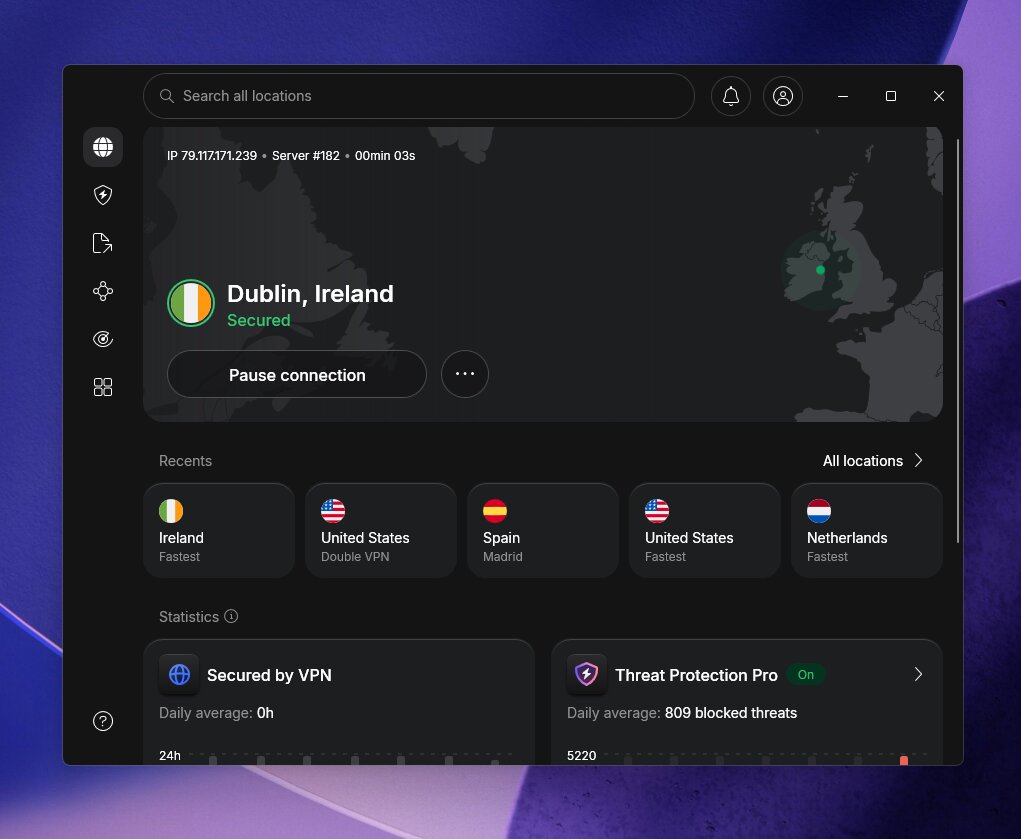
In my testing, NordVPN hit ~89% speed retention — genuinely fast, though I consistently see Surfshark performing better in my head-to-head comparisons. What NordVPN offers that Surfshark doesn’t quite match is its sheer server network breadth and Threat Protection Pro, which blocks ads and malware at the DNS level without the VPN tunnel needing to be active.
The macOS app is polished and well-optimized for Apple Silicon Macs. If you want a premium VPN for your Mac and don’t mind paying slightly more than Surfshark, NordVPN delivers.
→ Read my full NordVPN review | Compare: Surfshark vs NordVPN
5. VeePN — Budget Free Option
Best for Budget Streaming
VeePN — Our verdict
VeePN offers a free trial and a very affordable paid plan. It’s a capable option for users who need basic VPN protection and occasional streaming on a tight budget, though it doesn’t match the privacy credentials of Proton VPN or the speed of Surfshark.
- ~88% speed retention — solid performance
- Budget-friendly at $1.99/mo on 2-year plan
- Free trial available
- Privacy credentials less established than competitors
- Smaller server network than NordVPN or Surfshark
VeePN is worth mentioning for users who are very budget-conscious. It reaches ~88% speed retention in my testing, which is respectable, and the current deal makes it one of the cheapest paid VPNs available. It has a free trial if you want to test the macOS app before committing.
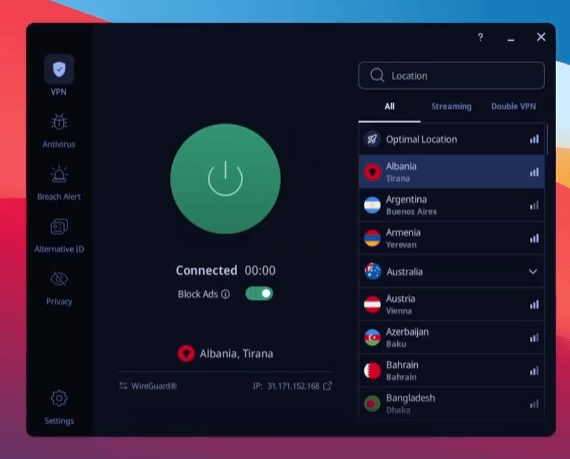
I’d only recommend VeePN over Proton VPN’s free plan if you need more server locations or streaming access than the free Proton tier provides, but don’t want to pay for a full Surfshark or NordVPN subscription.
→ Read my full VeePN review
Free VPNs for Mac — Comparison Table
| VPN | Free Tier | Data Limit | Server Choice | Streaming | Speed Retention | Audited |
|---|---|---|---|---|---|---|
| Surfshark | 7-day trial | Unlimited | ✅ Full access | ✅ Excellent | ~95% | ✅ Yes |
| Proton VPN | ✅ Permanent | Unlimited | ❌ Auto-assigned | ⚠️ Limited | ~91% (paid) | ✅ Annual |
| PrivadoVPN | ✅ Permanent | 10 GB/month | ✅ 10 locations | ✅ Good | ~85% (paid) | ❌ Not yet |
| NordVPN | 30-day MBG | Unlimited | ✅ Full access | ✅ Excellent | ~89% | ✅ Yes |
| VeePN | Free trial | Limited | ✅ Yes | ✅ Yes | ~88% | ⚠️ Limited |
How I Tested These VPNs on Mac
All testing was done on a MacBook with macOS Sonoma. Here’s what I evaluated for each VPN:
1
Speed testing
I ran multiple speed tests at different times of day using the same server locations to get a consistent picture of real-world performance on Mac. Speed retention is the percentage of your base connection speed you keep while the VPN is active.
2
Privacy and security
I checked for DNS and IP leaks, reviewed each provider’s logging policy, and noted whether it had undergone independent third-party audits. For a free VPN, an audited no-logs policy is non-negotiable.
3
macOS app quality
I installed and used each app on macOS to assess how well it’s built for Mac — not just a mobile port. I looked at ease of use, feature accessibility, and how it performs on both Intel and Apple Silicon machines.
4
Streaming performance
I tested each VPN’s ability to unblock Netflix, BBC iPlayer, and other streaming services on the free tier. Most free VPNs fail here — I called out the ones that actually work.
Free VPN for Mac: What to Look For
Not all free VPNs are created equal. Here’s what separates the legitimate ones from the ones you should avoid:
An audited no-logs policy
A privacy policy is just words on a page unless a third party has verified it. Proton VPN submits to annual independent audits. That’s the standard I hold all VPNs to — free or paid. If a free VPN can’t point to an audit, treat its privacy claims with skepticism.
A legitimate business model
Free VPNs have to make money somehow. The legitimate ones — like Proton VPN and PrivadoVPN — operate freemium models: the free tier is a loss leader designed to convert users to paid subscribers. The dangerous ones monetize your browsing data. If you can’t figure out how a free VPN makes money, that’s a red flag.
Core security features
Even on the free tier, a trustworthy VPN should include a kill switch, DNS leak protection, and strong encryption (AES-256 or ChaCha20). If a free VPN skips these fundamentals, move on.
A proper macOS app
Some free VPNs offer a decent Android app and an afterthought Mac build. On macOS, I specifically look for apps that feel built for the platform — not clunky mobile ports with a Mac icon slapped on.
Free VPNs for Mac to Avoid
Stay away from these:
- Hola VPN — routes your traffic through other users’ devices, compromising both your security and theirs
- Betternet — history of third-party ad involvement and questionable data handling practices
- Opera VPN — not actually a VPN, it’s a web proxy, and it logs user activity
- Random App Store VPNs — if you can’t find independent reviews, audit reports, or a real company behind the app, don’t install it. Some are little more than malware delivery vehicles.
Does Mac Have a Built-In VPN?
No. macOS doesn’t include a built-in VPN in the traditional sense. It does support VPN configurations (you can add IKEv2 or L2TP/IPSec connections under System Settings → VPN), but these require you to already have a VPN server to connect to — they’re not a standalone VPN service.
For actual VPN protection, you need a third-party app like the ones covered in this guide.
How to Get a Free VPN on Your Mac
1
Choose your VPN
For a permanent free option: go with Proton VPN. For streaming on the free tier: try PrivadoVPN. For the best overall experience risk-free: Surfshark’s 7-day trial or 30-day money-back guarantee.
2
Create an account
Head to the provider’s website and sign up. For Proton VPN’s free tier, you only need an email address. For Surfshark’s free trial, you’ll need to download the macOS or iOS app and start the trial from there.
3
Download the Mac app
Download directly from the provider’s website or the Mac App Store. I recommend the direct download where possible — it often gets updates faster.
4
Connect and browse
Log in, select a server (or let the app choose automatically), and hit connect. Enable the kill switch in settings for an extra layer of protection.
Frequently Asked Questions
Is there a 100% free VPN for Mac?
Yes. Proton VPN offers a genuinely free, permanent tier for macOS with unlimited data and no ads. PrivadoVPN also has a free plan with 10 GB per month and server selection. Both are safe, legitimate options with no-logs policies.
Does Mac come with a built-in VPN?
No. macOS supports adding VPN configurations manually (under System Settings → VPN), but this requires an external VPN server — it’s not a standalone VPN service. For actual VPN protection, you need a third-party app like Proton VPN or Surfshark.
Can I use a free VPN on both MacBook Air and MacBook Pro?
Yes — all the VPNs covered in this guide support both MacBook Air and MacBook Pro, including models running Apple Silicon (M1, M2, M3, and M4 chips). Just note that free plans typically allow only one simultaneous connection, so you’d need to log in and out between devices unless you’re on a paid plan.
Are free VPNs for Mac safe?
Some are, some absolutely aren’t. The free VPNs I’ve listed in this guide — particularly Proton VPN and PrivadoVPN — are safe. They run legitimate freemium business models and have proper no-logs policies. Avoid random App Store VPNs, Hola VPN, and anything you can’t find credible third-party reviews for.
Can a free VPN for Mac unblock Netflix?
PrivadoVPN’s free tier can unblock Netflix US and UK within its 10 GB monthly data cap. Most other free VPNs, including Proton VPN’s free plan, don’t reliably unblock streaming services. For consistent streaming access, a paid plan like Surfshark is the better choice.
What’s the best free VPN for Mac for privacy?
Proton VPN. It’s based in Switzerland (outside all major intelligence alliances), undergoes annual third-party security audits, has an audited no-logs policy, and runs an entirely ad-free free tier. It’s the most privacy-conscious free VPN available for macOS.
Is Surfshark free for Mac?
Surfshark isn’t permanently free, but it offers a 7-day free trial through its iOS and macOS apps, plus a 30-day money-back guarantee on all plans. At $1.99/month on the 2-year plan, it’s also the most affordable premium VPN I recommend — and in my testing it’s the fastest VPN available for Mac.
Does a free VPN slow down my Mac?
All VPNs add some overhead due to encryption, but a good one minimizes the impact. In my testing, Surfshark retains ~95% of your base connection speed — you’ll barely notice it’s on. Free VPN tiers tend to be slower due to server overcrowding, but Proton VPN and PrivadoVPN are both usable for everyday browsing on their free plans.
Final Verdict
If you want a completely free VPN for your Mac that you can use every day, Proton VPN is the answer — unlimited data, no ads, and audited privacy credentials that hold up to scrutiny.
If you want streaming access on a free plan, PrivadoVPN covers you within its 10 GB monthly cap.
But if you’re serious about getting the best VPN experience on your Mac — fast speeds, reliable streaming, and proper privacy protection — Surfshark is what I use and what I recommend. Start with the 7-day free trial or lean on the 30-day money-back guarantee. At $1.99/month, you’re getting the fastest VPN I’ve ever tested for less than a coffee.
87% OFF
Surfshark One — 2-Year Plan
The fastest VPN I’ve tested — includes VPN + antivirus + breach alerts for Mac and all your devices.
Unlimited devices
7-day free trial
Surfshark One included
Read next: