This page contains affiliate links. If you purchase a VPN through our links we may earn a commission at no extra cost to you. This never influences our reviews or rankings.
YouTube ads have gotten noticeably worse. What used to be a short pre-roll has turned into unskippable mid-roll interruptions every few minutes — and YouTube is actively fighting back against the tools we use to block them. I’ve spent years testing ad blockers on my two YouTube channels, and I can tell you firsthand: most of them have stopped working.
In May 2026, I tested the most popular ad blockers on Chrome, Firefox, Edge, Android, and iOS to find out which ones still actually block YouTube ads without triggering detection warnings or breaking video playback. Below are the six that made the cut.
The 6 Best YouTube Ad Blockers in May 2026
- Surfshark CleanWeb — Best overall YouTube ad blocker
- NordVPN Threat Protection — Best for desktop power users
- Proton VPN NetShield — Best for privacy-focused users
- IPVanish — Best budget VPN with ad blocking
- uBlock Origin — Best free browser extension
- Ghostery — Best free tracker-focused option
1. Surfshark CleanWeb — Best YouTube Ad Blocker in 2026
Best Overall

Surfshark CleanWeb — Our verdict
The most complete YouTube ad blocker in 2026. CleanWeb blocks pre-roll and mid-roll video ads consistently across browsers and mobile, and the Surfshark One bundle adds a VPN, antivirus, and data breach alerts for under $2/month.
- Blocked 100% of YouTube video ads in my desktop and mobile tests
- Works on Chrome, Firefox, Edge, Android, iOS, Fire TV, and more
- Blocks trackers, cookie pop-ups, and malware threats
- Unlimited simultaneous devices
- Includes a fast VPN (~95% speed retention in my tests)
- CleanWeb 2.0 (the most advanced version) is browser-extension only
- No standalone plan — requires a Surfshark subscription
Surfshark CleanWeb is my number-one recommendation for blocking YouTube ads, and it’s the tool I keep coming back to after testing dozens of alternatives. The CleanWeb feature is built into every Surfshark subscription and works at the system level — meaning it filters ads before they even reach your browser or app.
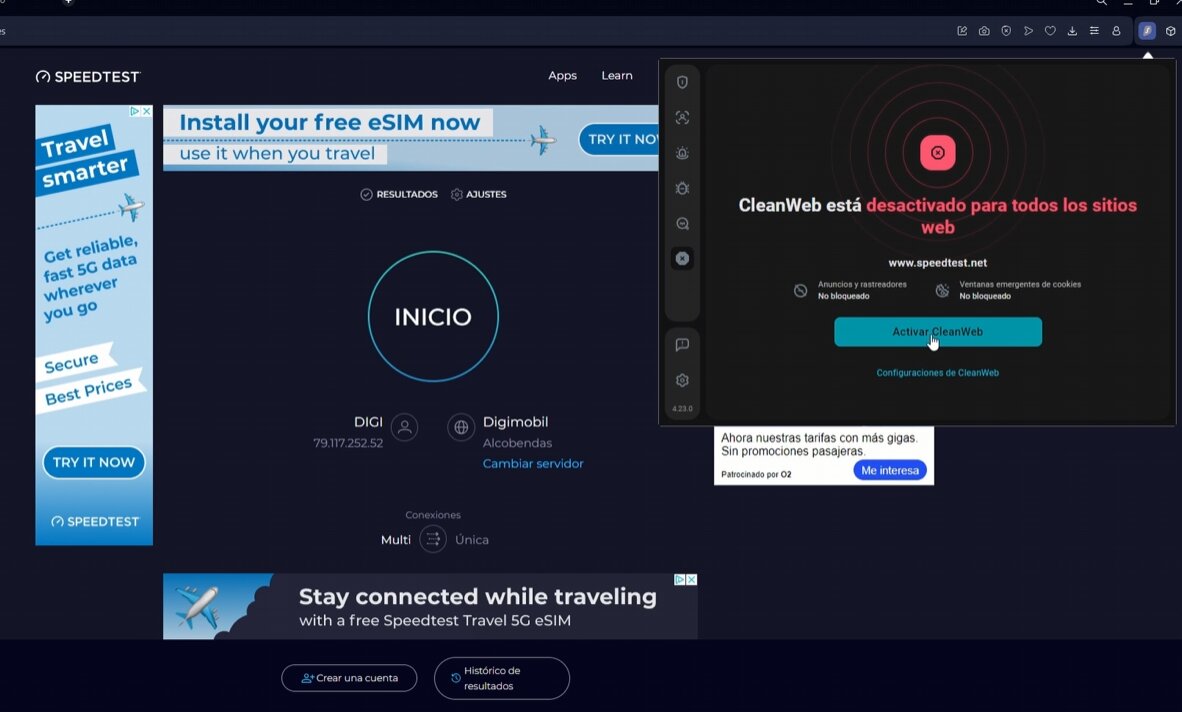
Website with ads, CleanWeb disabled.
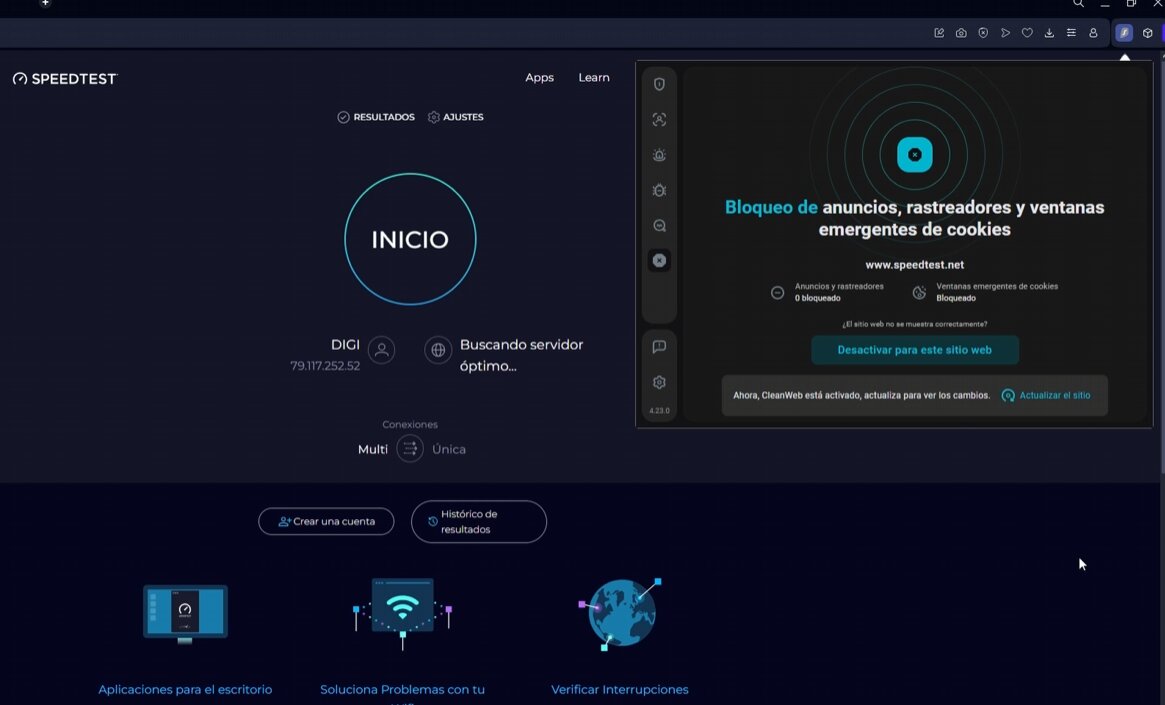
Website ad-free when Surfshark’s CleanWeb feature is enabled.
In my tests on both desktop (Chrome, Firefox, Edge) and mobile (Android and iOS), CleanWeb blocked every pre-roll and mid-roll YouTube video ad without exception. YouTube never threw up a detection warning during my sessions. Sponsored banners in the sidebar still appeared occasionally, but the video ads — the ones that actually interrupt your viewing — were gone.
The CleanWeb 2.0 version, available in the browser extension, is even more aggressive. It strips cookie consent pop-ups, blocks trackers, and alerts you if a site is flagged for malware. Combined with Surfshark’s VPN (which consistently hits around 95% speed retention in my speed tests — the fastest I’ve recorded across all the VPNs I’ve tested), you’re getting a serious privacy and security upgrade for the price of a cup of coffee per month.
The Surfshark One plan is what I recommend. It adds an antivirus and data breach monitoring on top of everything above, and it’s only marginally more expensive than the base plan. At $1.78/month on the 2-year plan with 88% off, it’s genuinely hard to argue against.
What I liked
- 100% YouTube video ad blocking in my tests (desktop and mobile)
- Works system-wide — not just in your browser
- Cookie pop-up blocking is genuinely useful day-to-day
- Fastest VPN I’ve tested (~95% speed retention)
- Unlimited devices on one account
- 30-day money-back guarantee
What I didn’t like
- CleanWeb 2.0 requires the browser extension — the standalone VPN app blocks less aggressively
- Some sidebar/banner ads still slip through on mobile
- Not a standalone product — you’re buying a VPN subscription
Read my full Surfshark review for a deeper look at the VPN side of things, or check the Surfshark coupon page for the latest discount.
2. NordVPN Threat Protection — Best for Desktop Power Users
Best for Desktop

NordVPN Threat Protection — Our verdict
A powerful ad and malware blocker bundled with one of the most well-known VPNs. Threat Protection Pro performs well on desktop browsers, though it can be inconsistent on mobile YouTube apps.
- Excellent malware and tracker blocking
- URL tracking parameter removal
- Real-time file scanning on downloads
- Works on Windows, macOS, Android, iOS
- Less consistent at blocking YouTube ads on mobile than desktop
- More expensive than Surfshark ($3.59/mo vs. $1.78/mo)
- Threat Protection Pro is desktop-only; mobile gets the lighter version
NordVPN’s Threat Protection is a solid YouTube ad blocker, particularly if you spend most of your time watching on a desktop browser. In my tests on Chrome and Firefox on Windows and macOS, Threat Protection Pro blocked YouTube pre-roll and mid-roll ads reliably and didn’t trigger any YouTube detection warnings.
Where it falls behind Surfshark is on mobile. The full Threat Protection Pro feature is desktop-only — mobile devices get Threat Protection Lite, which uses DNS-level filtering. This is effective for blocking many ad domains, but YouTube’s server-side ad injection means some in-app ads still slip through on Android and iOS.
The standout feature that sets Threat Protection apart is URL trimming. It automatically strips tracking parameters from every URL you visit — the kind of invisible surveillance you don’t usually notice but that follows you around the web. Combined with real-time malware scanning on downloaded files, it’s a genuinely useful security layer, not just an ad blocker.
Speed-wise, NordVPN is fast (~89% speed retention in my tests), though I consistently find Surfshark slightly quicker. The price difference is also noticeable at scale — NordVPN’s Plus plan runs $3.59/month versus Surfshark One at $1.78/month.
If you’re primarily a desktop user and want strong malware protection alongside your ad blocking, NordVPN Threat Protection is worth considering. But if you watch YouTube on your phone as much as your laptop, Surfshark CleanWeb is the better fit.
Check out my full NordVPN review or the NordVPN coupon page for current deals.
3. Proton VPN NetShield — Best for Privacy-Focused Users
Best for Privacy

Proton VPN NetShield — Our verdict
The most privacy-respecting ad blocker on this list, built on Proton’s Swiss-based no-logs infrastructure. NetShield blocks ads and malware at the DNS level — effective in browsers, though limited in mobile YouTube apps.
- Swiss jurisdiction — among the strongest privacy protections available
- Independently audited no-logs policy
- Blocks malware and trackers in addition to ads
- Available on all major platforms
- DNS-level blocking means some YouTube in-app ads still appear
- No cookie pop-up blocking
- Slightly slower than Surfshark in my speed tests
If privacy is your primary concern and YouTube ad blocking is secondary, Proton VPN with NetShield is the most trustworthy option on this list. Proton is headquartered in Switzerland, operates under strict privacy laws, and has had its no-logs policy independently audited — something you can’t say about most VPN providers.
NetShield works by blocking known ad-serving and malware domains at the DNS level. In my browser tests on Chrome and Firefox, it cut out a significant chunk of YouTube’s ad load. However, because it operates at DNS level rather than with a browser extension, it’s less effective against YouTube’s server-side ad injection — where ads are stitched directly into the video stream before reaching your device.
For desktop browser use, Proton VPN NetShield is a solid performer (~91% speed retention). For mobile YouTube app users who prioritize privacy above all else, it’s still worth using — just know that some ads may still appear in the app.
See the full Proton VPN review or the Proton VPN coupon page.
4. IPVanish — Best Budget VPN with Ad Blocking
Best Budget Pick

IPVanish — Our verdict
A fast, affordable VPN with built-in threat protection that covers ad blocking alongside unlimited device connections. A strong value option if you already want a VPN and want ad filtering thrown in.
- Unlimited simultaneous device connections
- Very fast speeds (~92% retention in my tests)
- Budget-friendly at $2.19/month (24-month plan)
- Good for streaming and torrenting alongside ad blocking
- Ad blocking is less granular than Surfshark CleanWeb
- No browser extension-based ad filtering
IPVanish doesn’t lead the pack on raw ad-blocking power, but it earns its place here because of its combination of speed, price, and unlimited device coverage. At $2.19/month on the 24-month Essential plan with 83% off, it’s one of the cheapest full-featured VPNs I’ve tested — and it’s faster than you might expect (~92% speed retention in my tests, second only to Surfshark).
The built-in threat protection handles DNS-level ad and malware domain blocking. It won’t be as thorough as CleanWeb 2.0 in a browser extension, but it does reduce the ad load on YouTube noticeably in browser sessions. If you’re using IPVanish primarily as a VPN and want some ad filtering on top without paying extra, it’s a practical choice.
For households with many devices, IPVanish’s unlimited connections policy is particularly attractive. One subscription covers every phone, tablet, laptop, and smart TV in the house.
Read the full IPVanish review or check the IPVanish coupon page.
5. uBlock Origin — Best Free Browser Extension
Best Free Option

uBlock Origin — Our verdict
The best free ad blocker for desktop browsers — open-source, highly effective, and regularly updated. Not available on Chrome anymore, and it won’t touch the YouTube mobile app, but on Firefox and Edge it still gets the job done.
- Completely free and open-source
- Highly effective on Firefox and Edge
- Customizable filter lists for advanced users
- No longer available on Chrome (removed for Manifest V3 incompatibility)
- No mobile app — won’t block YouTube ads in the mobile app
- Advanced features have a learning curve
uBlock Origin is a legend in the ad-blocking world, and for good reason. It’s free, open-source, and in my tests on Firefox and Edge it still blocks YouTube ads effectively — including mid-roll interruptions. There’s no monetization agenda, no “acceptable ads” program, and no data collection.
The big caveat in 2026 is Chrome. Google’s shift to the Manifest V3 extension framework means the full uBlock Origin is no longer available in the Chrome Web Store. A lighter version (uBlock Origin Lite) exists for Chrome, but it doesn’t block all ads. If you’re a Chrome user, you’ll need to switch to one of the VPN-based options above or move to Firefox.
The other limitation is mobile. uBlock Origin has no app, so it offers zero protection in the YouTube mobile app on Android or iOS. It’s strictly a desktop browser tool.
For anyone who watches YouTube primarily in Firefox or Edge on a desktop and wants a free, no-nonsense ad blocker, uBlock Origin remains one of the best options available. If you need mobile coverage or want a more comprehensive privacy suite, Surfshark CleanWeb is the upgrade to consider.
6. Ghostery — Best Free Tracker-Focused Option
Best Free Tracker Blocker

Ghostery — Our verdict
A free, privacy-first browser extension with decent YouTube ad blocking. Primarily a tracker blocker, but it handles YouTube video ads well enough in my browser tests. Best used alongside another blocker if ad removal is your top priority.
- Completely free
- Excellent tracker transparency and statistics
- Cookie consent blocker built in
- Available on Chrome, Firefox, Edge, and Safari
- Some YouTube ads still slip through in my tests
- Interface can feel overwhelming for new users
- No dedicated customer support
Ghostery is worth including here because it’s genuinely useful as a free option — particularly if tracker blocking and privacy transparency matter to you as much as ad removal. It shows you exactly which trackers are active on every page you visit, and its “Never Consent” feature auto-dismisses cookie banners.
In my YouTube tests on Chrome and Firefox, Ghostery blocked autoplay pre-roll video ads consistently. Mid-roll ads were less reliable — a few slipped through during longer videos. Push notification ads were the weakest point.
The interface is also something to be aware of. The detailed analytics view can be genuinely confusing if you’re not already familiar with how trackers and ad networks work. For beginners, the learning curve is steeper than any of the VPN-based options above.
Ghostery is best positioned as a complementary tool — run it alongside your VPN’s ad blocker for maximum coverage — rather than a standalone YouTube ad blocking solution.
How I Tested These YouTube Ad Blockers
I tested each ad blocker across multiple devices and browsers in May 2026. Here’s what my testing process looked like:
For browsers, I tested Chrome, Firefox, and Edge on Windows and macOS. For mobile, I tested Android (both the YouTube browser and app) and iOS (Safari browser and the YouTube app). Each blocker was tested in a clean browser profile with no other extensions running.
I watched a minimum of two hours of YouTube content per blocker, focusing on long-form videos where mid-roll ads are most frequent. I noted whether pre-roll ads, mid-roll ads, banner ads, and sponsored card suggestions were blocked. I also noted whether YouTube displayed any ad blocker detection warning at any point.
The evaluation criteria I weighted most heavily were YouTube ad-blocking effectiveness (blocking all video ads, not just banners), mobile performance (since YouTube’s server-side ad injection makes mobile much harder than desktop), anti-detection reliability, and overall value for the price.
YouTube Ad Blockers Compared
| Ad Blocker | YouTube Ads Blocked? | Mobile App? | VPN Included? | Price | Free Option? |
|---|---|---|---|---|---|
| Surfshark CleanWeb | ✅ Yes — desktop & mobile | ✅ Yes | ✅ Yes | $1.78/mo | 30-day guarantee |
| NordVPN Threat Protection | ✅ Yes — best on desktop | ✅ Lite version | ✅ Yes | $3.59/mo | 30-day guarantee |
| Proton VPN NetShield | ✅ Yes — browser-focused | ✅ Yes | ✅ Yes | $2.99/mo | 30-day guarantee |
| IPVanish | ⚠️ Partial — DNS level | ✅ Yes | ✅ Yes | $2.19/mo | 30-day guarantee |
| uBlock Origin | ✅ Yes — Firefox/Edge only | ❌ No | ❌ No | Free | ✅ Completely free |
| Ghostery | ⚠️ Partial | ⚠️ Browser only | ❌ No | Free | ✅ Completely free |
Why Is My YouTube Ad Blocker Not Working Anymore?
This is the question I get most often from viewers on my channels. The honest answer is that YouTube has gotten much better at detecting and countering ad blockers in 2026.
The biggest development is server-side ad insertion (SSAI). Instead of loading ads as separate requests (which blockers could intercept), YouTube now stitches ads directly into the video stream before it reaches your device. To a traditional ad blocker, the ad and the actual video content look identical — there’s nothing to filter out.
This is why browser extensions alone are often no longer enough, and why VPN-based blockers that work at the system level — like Surfshark CleanWeb — tend to hold up better. They combine DNS-level filtering, extension-level filtering, and VPN-layer filtering all at once.
If your current ad blocker has stopped working on YouTube, here’s what I’d try:
1
Update your ad blocker
Filter lists are updated constantly. An outdated blocker can fall behind YouTube’s changes within days. Force an update check before troubleshooting anything else.
2
Use the browser extension, not just the app
If you’re using a VPN-based blocker, make sure you also have the browser extension installed and enabled. The VPN app alone is less effective against YouTube’s current ad delivery methods.
3
Don’t run multiple ad blockers at once
Running two or more blockers simultaneously actually makes it easier for YouTube to detect you. Stick to one reliable option.
4
Switch to a more robust blocker
If you’re on a free browser extension that hasn’t been updated in a while, it may simply not be able to keep pace with YouTube’s current detection measures. Surfshark CleanWeb is my recommendation for anyone who’s hit this wall.
Is YouTube Premium Worth It Instead?
YouTube Premium costs $13.99/month for individual use. It completely removes ads and adds background play, offline downloads, and YouTube Music. It’s YouTube’s officially supported solution, so it will always work — no arms race with detection systems.
That said, $13.99/month is a lot compared to a VPN with ad blocking. Surfshark One at $1.78/month doesn’t just block YouTube ads — it blocks ads across every site you visit, protects your privacy, encrypts your traffic, and adds malware protection. That’s a completely different value proposition.
If you watch YouTube heavily across multiple devices and also use YouTube Music regularly, Premium might be worth it. But for most people who just want to stop the ads from interrupting their videos, a good ad blocker is a fraction of the cost with significantly more coverage.
Frequently Asked Questions
Which YouTube ad blocker actually works in May 2026?
Based on my testing, Surfshark CleanWeb is the most reliable YouTube ad blocker right now. It blocked 100% of video ads in my desktop and mobile tests without triggering YouTube’s detection. NordVPN Threat Protection and uBlock Origin (on Firefox/Edge) are also effective, particularly on desktop.
Why did my YouTube ad blocker stop working?
YouTube has implemented server-side ad insertion (SSAI), which stitches ads directly into the video stream before they reach your device. Traditional browser extensions can’t intercept these. Make sure your blocker is updated, use the browser extension version if one is available, and consider switching to a VPN-based blocker like Surfshark CleanWeb that works at the system level.
Is using an ad blocker on YouTube against the rules?
Yes — YouTube’s Terms of Service state that blocking ads violates their policies. YouTube may display warnings or restrict video playback if it detects an ad blocker. None of the blockers I recommend triggered these warnings in my current tests, but it’s something to be aware of.
What is the best free YouTube ad blocker?
uBlock Origin is the best free option for desktop Firefox and Edge users. Ghostery is another free choice with decent tracking protection. For mobile, there are no fully free options that reliably block YouTube in-app ads — Surfshark’s 30-day money-back guarantee is the closest thing to a risk-free trial.
Do ad blockers work in the YouTube mobile app?
This is where most ad blockers struggle. YouTube’s mobile app uses server-side ad insertion, which is harder to block than traditional web ads. Surfshark CleanWeb performed best in my mobile tests. uBlock Origin and browser-extension-only blockers offer no coverage inside the YouTube app.
Is YouTube Premium better than an ad blocker?
YouTube Premium is the most reliable way to watch without ads since it’s YouTube’s own supported solution. But at $13.99/month versus $1.78/month for Surfshark One (which also includes a VPN, malware protection, and cross-site ad blocking), the value comparison is stark. For most users, a good ad blocker offers more value for the money.
What’s the best YouTube ad blocker for Chrome?
uBlock Origin no longer works on Chrome due to Google’s Manifest V3 changes. For Chrome users, I recommend Surfshark’s browser extension with CleanWeb 2.0 enabled — it works on Chrome, Firefox, and Edge and is my top pick overall.
Can YouTube ban your account for using an ad blocker?
There are no widespread reports of permanent account bans for ad blocker use. YouTube’s current approach is to warn users and restrict video playback until the blocker is disabled. Using a well-maintained blocker like Surfshark CleanWeb significantly reduces the chance of being detected in the first place.
88% OFF
Surfshark One — 2-Year Plan
The best YouTube ad blocker in 2026, bundled with a fast VPN, antivirus, and data breach monitoring.
Unlimited Devices
~95% Speed Retention
Malware Protection
Cookie Pop-up Blocker